
Vector Search
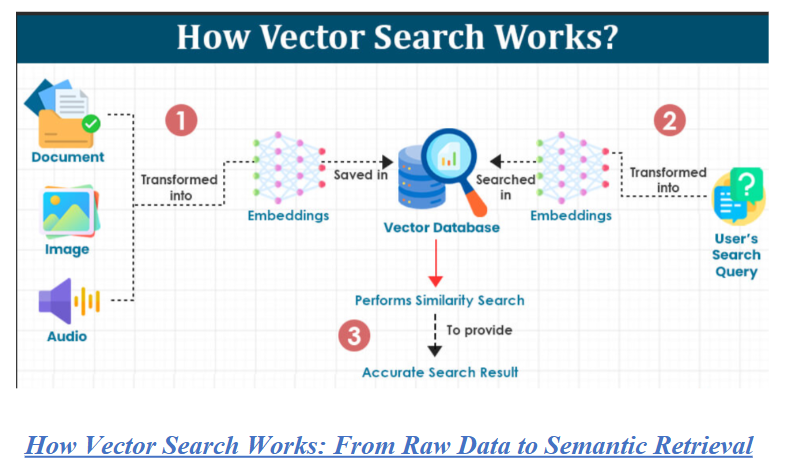
Vector search is a search technique used to find similar items or data points, typically represented as vectors, in large collections. Vectors, or embeddings, are numerical representations of words, entities, documents, images or videos. Vectors capture the semantic relationships between elements, enabling effective processing by machine learning models and artificial intelligence applications.

Vector Search VS Traditional Search
In contrast to traditional search, which typically uses keyword search, vector search relies on vector similarity search techniques like k-nearest neighbor search (knn) to retrieve data points similar to a query vector based on some distance metric. Vectors capture semantic relationships and similarities between data points, enabling semantic search instead of simple keyword search.
To illustrate the difference between traditional keyword and vector search, let’s go through an example. Say you are looking for information on the best pizza restaurant and you search for “best pizza restaurant” in a traditional keyword search engine. The keyword search looks for pages that contain the exact words “best”, “pizza” and “restaurant” and only returns results like “Best Pizza Restaurant” or “Pizza restaurant near me”. Traditional keyword search focuses on matching the keywords rather than understanding the context or intent behind the search.
By contrast, in a semantic vector search, the search engine understands the intent behind the query. Semantic, by definition, means relating to meaning in language, that is, semantic search understands the meaning and context of a query. In this case, it would look for content that talks about top-rated or highly recommended pizza places, even if the exact words “best pizza restaurant” are not used in the content. The results are more contextually relevant and might include articles or guides that discuss high quality pizza places in various locations.
Traditional search methods typically represent data using discrete tokens or features, such as keywords, tags or metadata. As shown in our example above, these methods rely on exact matches to retrieve relevant results. By contrast, vector search represents data as dense vectors (a vector in which most or all of the elements are non-zero) in a continuous vector space, the mathematical space in which data is represented as vectors. Each dimension of the dense vector corresponds to a latent feature or aspect of the data, an underlying characteristic or attribute that is not directly observed but is inferred from the data through mathematical models or algorithms. These latent features capture the hidden patterns and relationships in the data, enabling more meaningful and accurate representations of items as vectors in a high-dimensional space.
Step by step implementation of Vector Search:
- Text Embedding (Query Encoding)
- Input: “What are the symptoms of diabetes?”
- The query is passed through an embedding model (e.g., OpenAI Ada, Cohere, BGE, SentenceTransformers).
- Output: A dense vector (e.g., 768 or 1536 dimensions) representing the semantic meaning of the query.
- Document Embedding and Indexing
- All documents (e.g., FAQs, medical notes, ERP logs) are preprocessed and embedded similarly.
- These vectors are stored in a vector database (e.g., Pinecone, FAISS, Weaviate, Elasticsearch with k-NN).
- Each vector is linked to its source document, metadata, and ID.
- Similarity Search (Retrieval)
- The query vector is compared to all stored vectors using a distance metric:
- Cosine similarity (angle between vectors)
- Euclidean distance (straight-line distance)
- Dot product (projection-based relevance)
- The top-k most similar vectors are returned.
- Context Assembly
- Retrieved documents are formatted into a prompt or response context.
- In RAG, this context is passed to an LLM (e.g., GPT-4) for generation.
- In search engines, it’s displayed directly or used for filtering.
- Optional Hybrid Search
- Combine vector search with keyword filters or metadata constraints:
- Only retrieve documents tagged “diabetes” or “clinical”
- Filter by date, author, or source
- This improves precision and control.
Use cases or problem statement solved with Vector Search:
1.Chatbot Memory and Semantic Retrieval
- Problem: Traditional keyword search fails to retrieve relevant answers when users phrase questions differently than stored FAQs.
- Goal: Enable chatbots to retrieve semantically similar responses regardless of phrasing.
- Vector Search Solution:
- Embed user queries and stored FAQs using transformer models (e.g., OpenAI Ada, BGE, Cohere).
- Store embeddings in a vector DB (e.g., Pinecone, FAISS).
- Retrieve top-k semantically similar chunks using cosine similarity.
- Feed retrieved context into GPT-4 for grounded generation.
- Retrieval-Augmented Generation (RAG) Pipelines
- Problem: LLMs hallucinate when answering domain-specific queries without external grounding.
- Goal: Retrieve relevant documents to feed into the prompt for accurate, context-aware generation.
- Vector Search Solution:
- Chunk and embed proprietary documents (e.g., contracts, ERP logs).
- Store in a vector DB with metadata filters.
- Retrieve top-k matches based on semantic similarity.
- Assemble context for GPT-4 or Claude to generate grounded answers.
- ERP Audit Trail and Log Analysis
- Problem: Analysts need to trace user actions across fragmented logs, but keyword search misses context.
- Goal: Enable semantic search over ERP logs to identify patterns, anomalies, or compliance violations.
- Vector Search Solution:
- Embed log entries with user actions, timestamps, and module metadata.
- Retrieve similar events (e.g., “unauthorized access”, “approval bypass”) using vector similarity.
- Filter by user ID, module, or date for precision.
- Healthcare Document Search
- Problem: Clinicians need to search across medical notes, prescriptions, and reports using natural language, but terminology varies.
- Goal: Enable semantic search over medical documents with domain-specific embeddings.
- Vector Search Solution:
- Use domain-tuned models (e.g., BioBERT, ClinicalBERT) to embed documents.
- Retrieve similar cases, symptoms, or treatments using cosine similarity.
- Integrate with FHIR APIs or hospital dashboards.
- Legal Clause Extraction and Similarity Matching
- Problem: Legal teams need to find similar clauses across contracts, but keyword search misses variations.
- Goal: Enable semantic clause matching and risk analysis.
- Vector Search Solution:
- Embed clauses using transformer models.
- Retrieve similar clauses (e.g., indemnity, termination) across documents.
- Highlight differences and generate summaries using LLMs.
Pros of Vector Search:
1.Semantic Understanding Beyond Keywords
Vector search captures meaning, not just literal terms. It enables retrieval of conceptually similar content even when phrasing differs—e.g., “How do I reset my password?” matches “To change your login credentials…” This is essential for chatbots, RAG, and multilingual support.
- Multilingual and Domain-Agnostic
Embeddings work across languages and specialized vocabularies. Whether you’re indexing medical notes, legal clauses, or ERP logs, vector search adapts without needing handcrafted synonyms or keyword lists.
- Flexible Querying with Natural Language
Users can ask questions in free-form language. No need for exact phrasing, Boolean logic, or rigid filters. This improves accessibility and user experience in search interfaces and conversational agents.
- Modular Integration with Backend Pipelines
Vector search fits cleanly into modern stacks:
- FastAPI or Flask for API orchestration
- LangChain or LlamaIndex for RAG
- Pinecone, FAISS, Weaviate, or Elasticsearch for storage
- GPT-4 or Claude for generation
This modularity supports scalable, maintainable architectures.
- Real-Time Retrieval at Scale
Vector databases like Pinecone and Weaviate support low-latency, top-k retrieval with metadata filtering. You can serve thousands of queries per second with horizontal scaling and caching.
Cons of Vector Search:
- High-Dimensional Complexity
Embeddings are large (e.g., 768–1536 dimensions), requiring specialized indexing (e.g., HNSW, IVF) and memory optimization. Poor indexing can lead to slow retrieval or high resource usage.
- Probabilistic Matching
Vector search is approximate, not exact. It may return semantically similar but irrelevant results—especially if embeddings are noisy, chunking is poor, or the query is ambiguous.
- Retrieval Quality Depends on Embedding Model
The effectiveness of vector search hinges on the quality of your embeddings. Generic models may miss domain-specific nuances (e.g., legal, medical, ERP). Fine-tuning or using domain-specific models is often necessary.
- Limited Explainability
Unlike keyword search, vector similarity lacks transparent scoring. It’s harder to explain why a result was retrieved, which can be problematic in regulated or audit-heavy environments.
- Latency Overhead in RAG Pipelines
Embedding + retrieval + prompt assembly adds latency. For real-time systems, caching, top-k tuning, and prompt optimization are essential to maintain responsiveness.
Alternatives to Vector Search:
- Graph-Based Retrieval (GraphRAG)
- How it works:Constructs a knowledge graph from documents using LLMs to extract entities, relationships, and claims.
- Strengths:Enables multi-hop reasoning, semantic clustering, and contextual traversal.
- Use case:Regulatory traceability, supply chain analysis, or any query requiring relational depth.
- Trade-off:Higher build cost and periodic refresh needed to avoid stale graphs.
- Agentic RAG
- How it works:AI agents dynamically decide when and howto retrieve—using vector search, keyword search, APIs, or even web search.
- Strengths:Adaptive, intelligent retrieval tailored to query complexity.
- Use case:Chatbots, autonomous research agents, or multi-modal assistants.
- Trade-off:Requires orchestration logic and tool integration.
- Keyword-Based Search (Traditional IR)
- How it works:Uses inverted indices and exact term matching.
- Strengths:Fast, interpretable, and ideal for structured queries or compliance logs.
- Use case:Legal document search, audit trails, or metadata-heavy corpora.
- Trade-off:Lacks semantic flexibility—misses paraphrased or conceptually similar content.
- Hybrid Filtering (Metadata + Embeddings)
- How it works:Combines vector similarity with structured filters (e.g., date, author, category).
- Strengths:Improves precision and relevance in domain-specific retrieval.
- Use case:Enterprise search, personalized recommendations, or filtered RAG pipelines.
- Trade-off:Requires well-tagged metadata and dual-query logic.
- Sparse Embedding Search (e.g., SPLADE, BM25 + Dense)
- How it works:Uses sparse representations to retain keyword salience while enabling semantic matching.
- Strengths:Bridges the gap between keyword and vector search.
- Use case:E-commerce, biomedical search, or hybrid NLP tasks.
- Trade-off:Slightly more complex indexing and scoring pipeline.
ThirdEye Data’s Project Reference Where We Used Vector Search:
Automated Document Tagging & Indexing System:
An IT company required an advanced document management solution to streamline information retrieval from vast repositories. Traditional keyword-based searches lacked contextual awareness, making it difficult to extract meaningful insights efficiently. The Automated Document Tagging & Indexing System leverages AI-driven NLP to enhance search capabilities by intelligently extracting tags, indexing documents, and enabling precise, context-aware queries.
Frequently asked questions about Vector Search:
Q1: How does vector search differ from keyword search?
Answer: Keyword search matches literal terms using inverted indexes. Vector search compares semantic meaning using high-dimensional embeddings. It retrieves conceptually similar content even when phrasing differs—essential for chatbots, RAG, and multilingual support.
Q2: What are embeddings and how are they generated?
Answer: Embeddings are numerical representations of text, generated by transformer models (e.g., OpenAI Ada, Cohere, BGE, SentenceTransformers). They capture context, syntax, and semantics, enabling similarity comparison via cosine, dot product, or Euclidean distance.
Q3: Which vector databases are best for production?
Answer:
- Pinecone: Managed, scalable, metadata filtering, great for RAG
- Weaviate: Schema-aware, hybrid search, GraphQL API
- FAISS: Open-source, fast local deployment
- Qdrant: Rust-based, high performance, filtering
- Milvus: GPU-accelerated, ANN indexing
Choose based on latency, scale, filtering needs, and deployment model.
Q4: Can vector search be combined with keyword filters?
Answer: Yes—this is called hybrid search. You retrieve semantically similar documents and apply keyword or metadata filters (e.g., date, author, tags). This improves precision and control, especi
Q5: How do I evaluate vector search performance?
Answer:
- Recall@k: Are relevant documents retrieved in top-k?
- Precision: Are retrieved documents truly relevant?
- Latency: End-to-end query time
- Embedding quality: Use domain-tuned models for better results
- User feedback: Thumbs up/down, click-through rates
Use synthetic benchmarks or human-in-the-loop evaluation for tuning.
Conclusion:
Vector search is a foundational technology for building intelligent, context-aware systems. It enables:
- Semantic retrieval across varied phrasing
- Multilingual and domain-specific Q&A
- Chatbot memory and contextual recall
- RAG pipelines for grounded generation
- Clause matching and recommendation systems
Use Vector Search When:
- You need semantic matching, not just literal terms
- You’re building chatbots, RAG, or document Q&A
- You want modular, scalable integration with FastAPI, LangChain, Pinecone
- You’re working with unstructured or semi-structured text
Consider Alternatives When:
- You need exact keyword matching or deterministic filters
- You require ACID transactions or relational joins
- You want transparent scoring and explainability
- You’re working with structured tabular data