A Business-Centric Comparative Analysisbetween Snowflake and Microsoft Power Platform
As organizations become more data-driven, leaders often face a common question:
“Should we invest in a powerful data platform like Snowflake, or adopt a business-focused platform like Microsoft Power Platform?”
Although both platforms talk about data, analytics, and AI, they are built for very different purposes. Snowflake serves as an enterprise data and analytics backbone, designed to store and analyze large volumes of data at scale. Microsoft Power Platform, on the other hand, focuses on turning data into action through low-code apps, workflows, dashboards, and AI-driven experiences.
This blog compares Snowflake and Microsoft Power Platform from a business perspective, highlighting the problems they solve, how they manage data, and where each platform fits best. The goal is to help decision-makers understand when to choose one, when to use the other, and why many organizations use both together.
First, let’s understand what they actually do.
Snowflake is a data platform for managing and analyzing huge amounts of data. It is built to store, process, and manage very large amounts of data for analytics and AI and with separable storage + compute, strong concurrency, and data sharing/marketplace patterns. We can use it to run heavy data queries, share data securely across teams or even with other companies, and scale performance up or down as needed. Storage and computing power are separated, so we only pay for what we use. The key features or products of Snowflake are:
- Snowflake Database (Core Data Platform)
- Virtual Warehouses (Compute Engine)
- Snowpark (Developer Framework)
- Dynamic Tables (Data Pipelines)
- Tasks
- Streamlit in Snowflake (Data Apps)
- Snowflake Marketplace & Secure Data Sharing
- Snowflake Cortex (AI Features)
Power platform is mainly a business app and automation platform. It helps people quickly create apps, automate processes, build dashboards, and create chatbots with little or no code. It is deeply connected to Microsoft tools like Teams, Excel, Outlook, and Dynamics. The key features or products of Power platform are:
- Power Apps (canvas + model-driven apps)
- Power Automate (workflow automation)
- Power BI (analytics/BI)
- Power Pages (websites/portals)
- Microsoft Copilot Studio (agents/bots)
- Dataverse (app data platform backing apps/flows/bots)
So, Snowflake competes as the enterprise data/AI backbone whereas Power Platform competes as the enterprise low-code business solution layer.
Below are the complete Architectures of Snowflake and Microsoft Power Platform which represents the complete data lifecycle, from ingestion and storage through transformation, compute execution, and visualization.
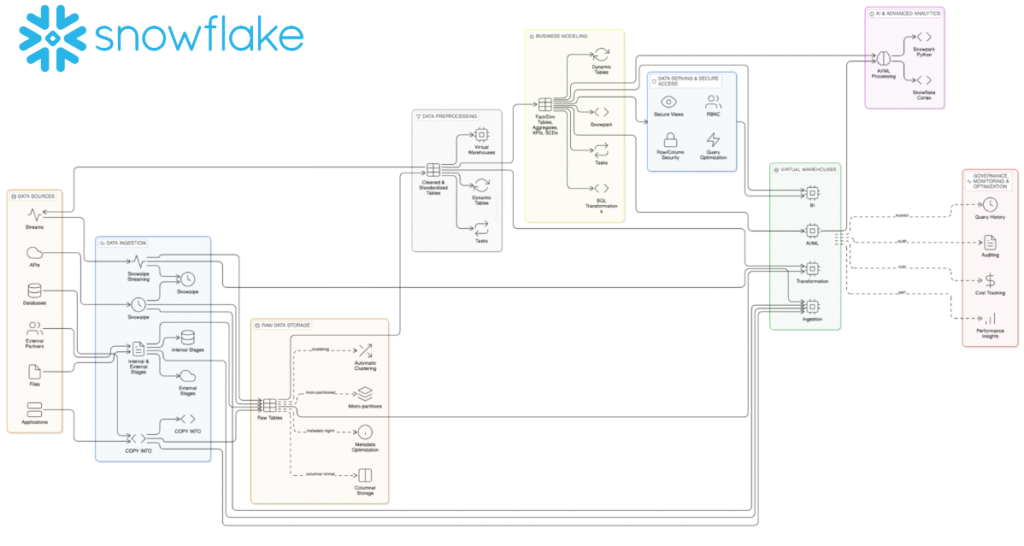
Snowflake Architecture
Snowflake: End-to-End Enterprise Data & Analytics Architecture
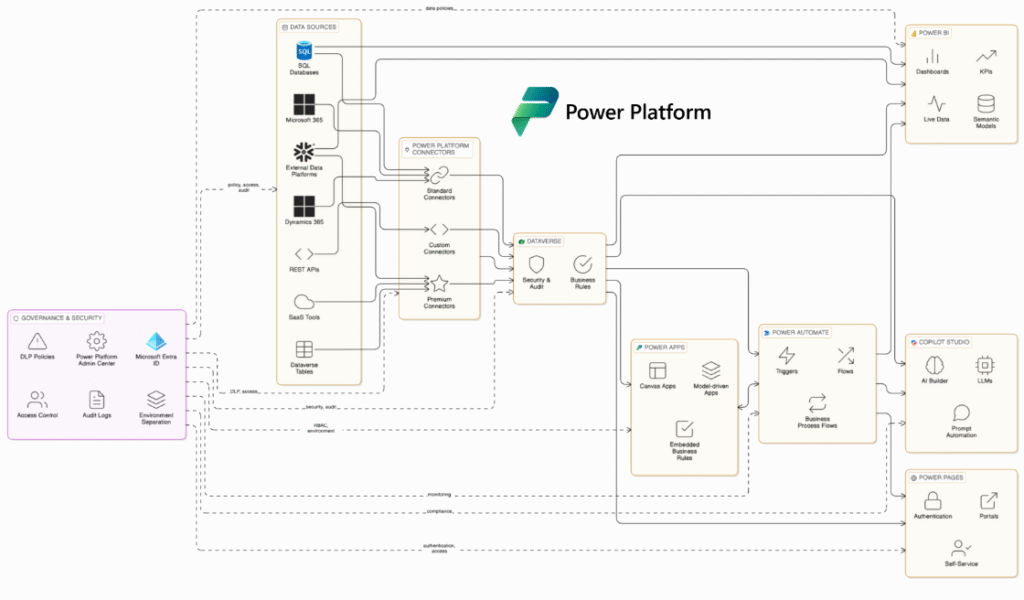
Power Platform Architecture
Microsoft Power Platform: End-to-End Business Application & Automation Architecture
Let’s take a closer look at Snowflake and Microsoft Power Platform through a feature-by-feature lens, highlighting the key products and capabilities each platform offers, how they fundamentally differ in purpose and design, and the practical advantages and trade-offs businesses should consider when choosing between them.
1. Core Purpose
Snowflake
Snowflake is built as an enterprise data and analytics backbone. It is designed to store, process, and analyze massive amounts of data for reporting, analytics, and AI, while allowing many teams to work at the same time securely.
- Products: Database, Virtual Warehouses, Snowpark, Dynamic Tables, Streamlit, Marketplace, Cortex.
- Best at: Central analytics and AI data platform with high concurrency and secure sharing.
Advantages
- Handles very large data volumes with high performance.
- Separate compute for teams ensures one workload does not slow down another.
- Cost controls like auto-suspend and resource monitors help manage spending.
Disadvantages
- Not meant for building business apps or workflows.
- Requires technical expertise and cost governance.
Power Platform
Power Platform is built to help organizations quickly create business apps, automate workflows, build dashboards, and deploy bots with little or no code, tightly integrated with Microsoft 365.
- Products: Power Apps, Power Automate, Power BI, Power Pages, Copilot Studio, Dataverse.
- Best at: Rapid app building, workflow automation, BI dashboards, and bots integrated with Microsoft 365.
Advantages
- Very fast to build apps and automate processes.
- Easy for business users to adopt with IT guardrails.
- Deep integration with Microsoft tools like Teams, Excel, and Outlook.
Disadvantages
- Licensing and capacity costs can grow over time.
- Not designed to handle massive analytics workloads like a data warehouse.
2. Data Storage & Modelling
Snowflake
Snowflake is designed to store and manage analytical data at massive scale. It works best for structured and semi-structured data used in reporting, analytics, and AI across multiple teams.
- Features: Tables, Iceberg support, Dynamic Tables.
Advantages
- Handles very large datasets efficiently.
- Excellent for complex queries, joins, and transformations.
- Well suited for analytics and machine learning data.
Disadvantages
- Not built for business app-style data like forms and workflows.
- Setting up app-level permissions and logic requires extra development work.
Power Platform (Dataverse)
Dataverse is a business data store designed for apps and workflows. It focuses on how people use data in everyday processes such as forms, approvals, and role-based access.
- Features: Managed tables/entities for apps, flows, websites.
Advantages
- Ideal for operational workflows with forms and business rules.
- Built-in role-based security for users and teams.
- Seamlessly connects with apps, flows, and portals.
Disadvantages
- Not designed for very large, analytics-heavy datasets.
- Less suitable for enterprise-scale reporting and AI workloads.
3. Compute & Scaling
Snowflake
Snowflake uses on-demand compute engines called Virtual Warehouses to run queries and workloads. Each team or use case can have its own compute, which can be scaled up or down automatically.
- Features: Virtual Warehouses, auto-suspend/resume, Resource Monitors.
Advantages
- Clear control over performance and cost.
- Multiple teams can run workloads at the same time without slowing each other down.
- Auto-suspend and resource monitors help reduce wasted spend.
Disadvantages
- Requires active cost management and monitoring.
- Without proper governance, usage can grow quickly and lead to unexpected bills.
Power Platform
Power Platform runs as a managed service where scaling is tied to user licenses and Dataverse capacity rather than explicit compute settings.
- Features: Service capacity tied to licensing and Dataverse limits.
Advantages
- No need to manage servers or compute resources.
- Costs are easier to predict for normal app usage.
- Simple for business teams to scale adoption.
Disadvantages
- Cost increases show up indirectly (more users, more flows, more storage).
- It can be harder to understand exactly what is driving higher spend.
4. App Building & UI
Snowflake
Snowflake offers Streamlit to build lightweight, data-driven web apps directly on top of Snowflake data. These are mainly used by developers and data teams for analytics-style tools.
- Feature: Streamlit apps close to Snowflake data.
Advantages
- Excellent for internal data tools and dashboards.
- Keeps data close to where it lives, improving performance and security.
Disadvantages
- Not designed for full business applications.
- Lacks the low-code experience, forms, and workflows that business users need.
Power Platform
Power Platform uses Power Apps to build business applications with little or no code, designed for everyday business users.
- Feature: Power Apps.
Advantages
- Very fast to build and deploy apps.
- Works well on web and mobile.
- Deeply integrated with Microsoft tools like Teams and Outlook.
Disadvantages
- Without proper governance, many small apps can be created and become hard to manage
5. Workflow Automation
Snowflake
Snowflake supports data workflows using SQL tasks, pipelines, and developer tools. These are designed for moving and transforming data inside the platform.
- Features: SQL tasks, pipelines, developer tools.
Advantages
- Very strong for data pipelines and transformations.
- Keeps data processing close to where the data lives.
Disadvantages
- Not built for human workflows like approvals or task routing.
- Not suited for automating business processes across systems.
Power Platform
Power Platform uses Power Automate to design business workflows and integrations.
- Feature: Power Automate.
Advantages
- Excellent for automating business processes (approvals, notifications, integrations).
- Large library of connectors to other systems and services.
Disadvantages
- Premium connectors and licenses can increase cost.
- Complex workflows need clear standards to stay manageable.
6. Analytics & BI
Snowflake
Snowflake acts as the analytics engine behind BI tools.
- Role: Backend for BI tools.
Advantages
- Excellent for large-scale, enterprise analytics.
- Handles complex queries and large datasets efficiently.
Disadvantages
- Does not provide rich end-user reporting by itself.
- Requires a BI tool such as Power BI for dashboards and reports.
Power Platform
Power Platform includes Power BI for reporting and dashboards.
- Feature: Power BI.
Advantages
- Strong visualization and sharing within the Microsoft ecosystem.
- Easy for business users to create and consume reports.
Disadvantages
- Power BI is not a data warehouse.
- Large and complex data estates often still need Snowflake as the backend.
7. AI Features
Snowflake
Snowflake provides AI and machine learning capabilities through features like Cortex and its ML foundation, focusing on using large, governed datasets for analytics and AI.
- Features: Cortex, ML/AI foundation.
Advantages
- Provides a strong and secure data foundation for AI and ML workloads.
- Keeps data and AI processing in one governed platform.
Disadvantages
- More technical in nature.
- Not as easy for everyday business users compared to Copilot-style tools.
Power Platform
Power Platform offers Copilot Studio and AI Builder to bring AI directly into apps and workflows.
- Features: Copilot Studio, AI Builder.
Advantages
- Very easy to embed AI into business apps and processes.
- Designed for non-technical users to adopt quickly.
Disadvantages
- AI usage and connectors can increase licensing costs.
- Requires governance to control usage and spend.
8. Governance & Security
Snowflake
Snowflake focuses on data platform governance with tools that control usage, cost, and access.
- Features: Resource Monitors, auto-suspend, secure data ops.
Advantages
- Strong platform-level controls over compute and data access.
- Well suited for enterprise data governance and compliance.
Disadvantages
- Designed mainly for data teams.
- Does not address citizen-developer or app sprawl challenges.
Power Platform
Power Platform provides governance for low-code development through environment management and DLP policies.
- Features: DLP policies, licensing governance.
Advantages
- Strong guardrails for large-scale low-code adoption.
- Helps prevent data leakage and uncontrolled app creation.
Disadvantages
- Requires active administration and clear policies.
- Without management, environments and apps can grow quickly and become hard to control.
9. Collaboration
Snowflake
Snowflake enables collaboration through secure data sharing, clean rooms, and cross-organization access to live datasets.
- Features: Data sharing, clean rooms, cross-org collaboration.
Advantages
- Excellent for sharing data securely across teams and partners.
- No need to copy data—everyone works on the same source.
Disadvantages
- Not designed for day-to-day business collaboration.
- Lacks features like forms, tasks, and approvals.
Power Platform
Power Platform supports collaboration through apps, workflows, and dashboards inside Teams and Microsoft 365.
- Features: Apps, flows, dashboards in Teams/M365.
Advantages
- Ideal for process-driven collaboration (request, approve, act, report).
- Brings people together around apps and workflows.
Disadvantages
- Not built for governed, marketplace-style data sharing.
- Less suitable for cross-company data product collaboration.
10. Pricing & Cost
Snowflake
Snowflake uses a consumption-based pricing model where you pay for what you use.
Model
- Compute (credits)
- Storage
- Data transfer
Advantages
- Very flexible and elastic.
- You only pay for the resources you actually use.
Disadvantages
- Costs can grow if warehouses are left running.
- Spiky workloads can increase spend.
- Data egress and transfer can add unexpected cost.
Power Platform
Power Platform uses a license-based pricing model.
Advantages
- Predictable subscription-style pricing.
- Easy to budget per user or per team.
Disadvantages
- Premium connectors and AI features increase cost.
- Dataverse capacity planning can become complex.
Final Take
- Snowflake = Best for enterprise-scale analytics and AI data backbone.
- Power Platform = Best for low-code apps, workflows, BI, and automation.
- They complement each other:
As this comparison shows,
Snowflake handles the heavy data lifting; Power Platform makes it usable for business processes.
So, Snowflake and Microsoft Power Platform are designed to solve very different problems across the enterprise. Snowflake provides a powerful, scalable foundation for data analytics and AI, while Microsoft Power Platform focuses on enabling business teams to build applications, automate processes, and act on insights quickly.
The real value emerges not from choosing one over the other, but from using each where it fits best. Snowflake helps organizations make sense of data at scale; Power Platform helps them turn those insights into everyday business action. Together, they bridge the gap between data and decision-making, ensuring that insight doesn’t just exist but drives outcomes.