Azure Computer Vision
AI services around vision have become a core function as we look to replace human tasks. Much of what we do revolves around looking at objects (hence vision) and deciding what we want to. In many cases for a computer to work with objects, we need them to be stored as an image we can then conduct image analysis upon. Image analysis in Azure involves using pre-built Computer Vision APIs to extract meaningful information from images. Emphasis here is on pre-built/pre-trained models.

Architecture and Integration of Azure Computer Vision:
Azure Computer Vision is built on RESTful APIs and SDKs available in multiple languages (Python, C#, JavaScript, etc.). It integrates seamlessly with:
- Azure Blob Storagefor storing images and videos.
- Azure Functionsfor serverless automation.
- Power Automatefor low-code workflows.
- Azure Cognitive Searchfor indexing visual content.
It can also be deployed on the edge using Azure Stackor IoT devicesfor offline or low-latency scenarios.
Security & Compliance
- Complies with GDPR, ISO, HIPAA, and other global standards.
- Offers role-based access control and encryption at rest and in transit.
- Supports private endpoints and virtual networks for secure deployments.
Model Training vs Prebuilt Models
Azure Computer Vision uses pre-trained modelsfor general tasks. For domain-specific needs (e.g., identifying custom objects like industrial parts), Microsoft offers Custom Vision, a related service that allows users to train their own models using labeled data.
Language & Region Support
- OCR supports over 25 languages including English, Chinese, Arabic, Hindi, and more.
- Image analysis and captioning are optimized for English but expanding to other languages.
Service Features (Accessed via API):
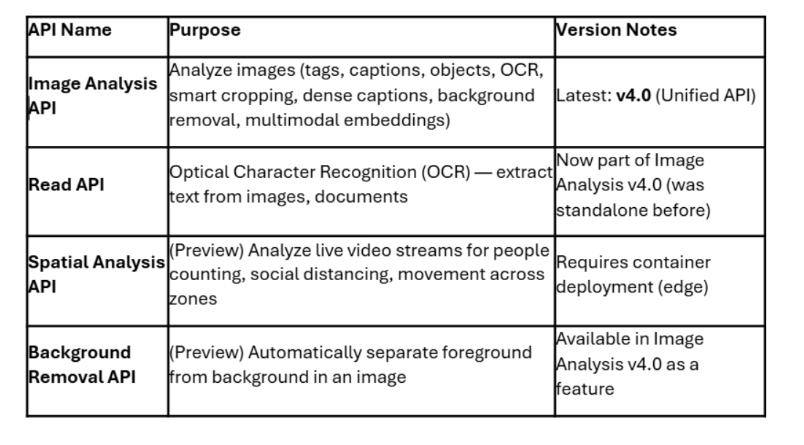
Once you have your Azure AI Services up and running with your Computer Vision endpoint, it’s important to understand what you can do with that endpoint. There are multiple APIs which you can leverage.
You get access to Image Analysis, Read (OCR), Spatial Analysis, and Background Removal directly with the Azure Computer Vision resource.

Use cases or problem statement solved with Azure Computer Vision:
- Healthcare – Digitizing Medical Records
- Problem Statement: Hospitals struggle with managing handwritten prescriptions and patient records, leading to errors and inefficiencies.
- Goal: Automate extraction of text from medical documents to improve accuracy and speed.
- Solution: Azure Computer Vision’s OCR and Read API digitize handwritten notes and printed forms, enabling searchable, structured data for EMR systems.
- Retail – Customer Behavior Analysis
- Problem Statement: Retailers lack insights into in-store customer movement and engagement.
- Goal: Track foot traffic and dwell time to optimize store layout and staffing.
- Solution: Spatial Analysis detects people in real-time video feeds, measuring movement patterns and occupancy levels.
- Finance – Automated Invoice Processing
- Problem Statement: Manual invoice data entry is time-consuming and error-prone.
- Goal: Extract structured data from invoices for faster processing and validation.
- Solution: OCR and layout-aware Read API extract vendor names, amounts, and dates from scanned invoices, integrating with ERP systems.
- Government – Accessibility for Visually Impaired
- Problem Statement: Public websites and services often lack image descriptions, limiting accessibility.
- Goal: Automatically generate alt text for images to support screen readers.
- Solution: Image Analysis API provides descriptive captions for images, improving compliance with accessibility standards.
- Logistics – Package Damage Detection
- Problem Statement: Damaged goods often go unnoticed until delivery, causing customer dissatisfaction.
- Goal: Identify damaged packages during sorting and transit.
- Solution: Image tagging and object detection flag anomalies in package appearance, enabling early intervention.
Pros of Azure Computer Vision:
- Comprehensive Feature Set
- Offers image analysis, OCR, spatial analysis, and caption generation.
- Supports both printed and handwritten text recognition across multiple languages.
- Pre-trained Models
- No need to train models from scratch.
- Ideal for rapid deployment and prototyping.
- Scalability and Integration
- Seamlessly integrates with other Azure services (e.g., Blob Storage, Cognitive Search, Power Automate).
- Scales easily for enterprise workloads and global deployments.
- Edge Deployment Support
- Can be deployed on IoT devices or Azure Stack for offline or low-latency scenarios.
- Useful for smart cameras, kiosks, and industrial automation.
- Security and Compliance
- Meets global standards like GDPR, HIPAA, ISO.
- Offers encryption, private endpoints, and role-based access control.
Cons of Azure Computer Vision:
- Cost Considerations
- Pricing can escalate with high-volume image or video processing.
- Spatial analysis and Read API are billed separately and may require additional resources.
- Limited Customization in Prebuilt Models
- Pre-trained models may not perform well on niche or industry-specific tasks.
- Requires Custom Vision for specialized use cases, adding complexity.
- Latency and Performance
- Cloud-based processing may introduce latency for real-time applications.
- Edge deployment mitigates this but requires additional setup.
- Privacy and Data Sensitivity
- Uploading sensitive images (e.g., medical scans, personal photos) to the cloud raises privacy concerns.
- Requires strict governance and data protection policies.
- Complexity in Document Layouts
- While the Read API handles complex layouts, it may struggle with highly stylized or inconsistent formats.
- Requires post-processing to clean and structure extracted data.
Alternatives to Azure Computer Vision:
Certainly! Here’s a detailed breakdown of each major alternative to Azure Computer Vision, with each platform explained in its own paragraph:
Amazon Rekognitionis a cloud-based image and video analysis service offered by AWS. It excels in facial recognition, celebrity identification, and real-time video stream analysis. Rekognition is particularly strong in security and surveillance applications, offering features like face comparison, emotion detection, and person tracking. It integrates seamlessly with other AWS services, making it a natural choice for organizations already invested in the Amazon ecosystem.
Google Cloud Vision APIis known for its powerful OCR capabilities, landmark and logo detection, and support for a wide range of languages. It provides rich metadata about images, including dominant colors, web entities, and safe search detection. Google’s deep expertise in search and AI makes this platform highly effective for content moderation, document digitization, and global-scale image classification tasks.
IBM Watson Visual Recognitionoffers customizable image classification and object detection. It allows users to train models with their own datasets, making it suitable for industry-specific applications. Watson’s strength lies in its enterprise-grade security, integration with IBM Cloud, and support for hybrid deployments. It’s often used in regulated industries like healthcare and finance where data governance is critical.
Clarifaiis a versatile AI platform focused on visual recognition and edge deployment. It supports custom model training, video analytics, and workflow automation. Clarifai is particularly strong in industrial use cases such as manufacturing, logistics, and retail, where real-time image processing and low-latency inference are essential. Its flexible deployment options include cloud, on-premises, and edge devices.
OpenCV with Custom Machine Learning Modelsis an open-source alternative that gives developers full control over image processing pipelines. It’s ideal for academic research, prototyping, and highly customized solutions. While it lacks the plug-and-play convenience of cloud APIs, OpenCV supports a wide range of computer vision tasks including object tracking, image segmentation, and feature extraction. It requires more development effort but offers unmatched flexibility.
ABBYY FineReaderis a specialized OCR solution designed for high-accuracy document digitization. It’s widely used in legal, financial, and government sectors where precision and layout preservation are critical. ABBYY supports complex document structures, multi-language recognition, and integration with enterprise content management systems. It’s not a general-purpose vision API but excels in structured document processing.
Answering some Frequently asked questions about Azure Computer Vision:
- Can Azure Computer Vision process multiple images in one API call?
No, it processes one image per API call. To handle multiple images, you’ll need to loop through them or use parallel requests in your application logic. - What is the maximum image size supported by Azure Computer Vision?
The service supports images up to 4 MB in size and dimensions up to 10,000 x 10,000 pixels. Larger files will need to be resized or compressed before submission. - How can I increase the number of transactions per second (TPS)?
By default, the free tier allows up to 20 transactions per minute. To increase throughput, you can upgrade to a higher pricing tier, which supports more TPS and faster response times. - Which languages are supported for OCR?
Azure Computer Vision supports OCR in over 25 languages, including English, Spanish, Chinese, Arabic, Hindi, and more. It also handles mixed-language documents and complex scripts. - Is face detection still available in Azure Computer Vision?
No, face detection has been deprecated due to ethical and privacy concerns. For facial recognition tasks, Microsoft recommends using the Azure Face API, which has stricter compliance controls.
Conclusion:
Azure Computer Vision is a powerful and versatile tool for extracting insights from visual data. It offers a wide range of capabilities—from image tagging and captioning to advanced OCR and spatial analysis—making it suitable for industries such as healthcare, retail, logistics, and government. Its pre-trained models and seamless integration with the broader Azure ecosystem allow for rapid deployment and scalability, while its support for edge computing ensures flexibility in real-time or offline environments. However, users should be mindful of its limitations, including cost at scale, limited customization in prebuilt models, and the need for cloud connectivity unless edge solutions are implemented. For highly specialized or privacy-sensitive applications, alternatives like Google Cloud Vision, Amazon Rekognition, or OpenCV may offer better alignment. Ultimately, Azure Computer Vision is best suited for organizations seeking a secure, enterprise-grade solution for visual intelligence, especially when paired with other Azure services to build end-to-end AI workflows.