Elasticsearch
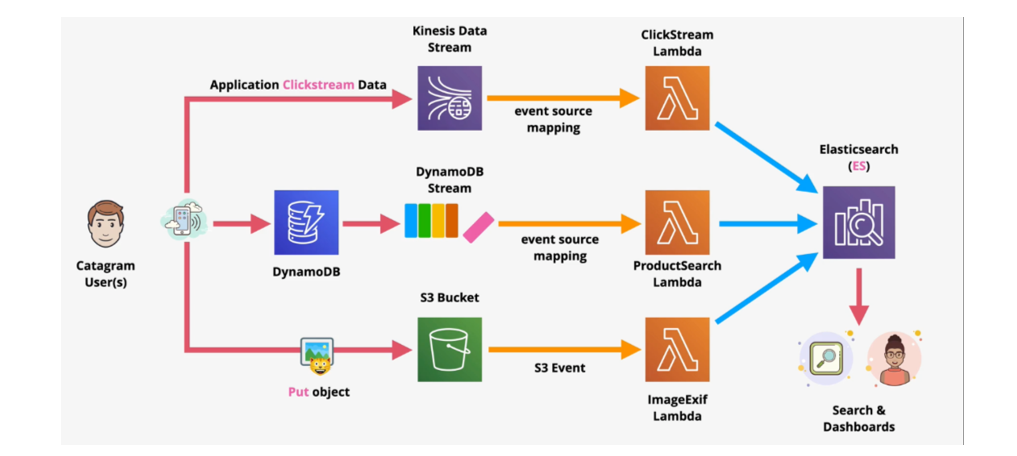
Elasticsearch is a distributed search and analytics engine built on Apache Lucene. Since its release in 2010, Elasticsearch has quickly become the most popular search engine and is commonly used for log analytics, full-text search, security intelligence, business analytics, and operational intelligence use cases. Elasticsearch can be used to search any kind of document. It provides scalable search, has near real-time-search, and supports multitenancy. “Elasticsearch is distributed, which means that indices can be divided into shards and each shard can have zero or more replicas. Each node hosts one or more shards and acts as a coordinator to delegate operations to the correct shard(s). Rebalancing and routing are done automatically”.Related data is often stored in the same index, which consists of one or more primary shards, and zero or more replica shards. Once an index has been created, the number of primary shards cannot be changed.
Elasticsearch is developed alongside the data collection and log-parsing engine Logstash, the analytics and visualization platform kibana, and the collection of lightweight data shippers called Beats. The four products are designed for use as an integrated solution, referred to as the “Elastic Stack” (Formerly the “ELK stack”, short for “Elasticsearch, Logstash, Kibana”.)

Core Features of Elasticsearch:
- Inverted Indexing: Optimized for full-text search with tokenization, stemming, and scoring.
- Distributed Architecture: Horizontally scalable across nodes and clusters.
- Schema-Free JSON Documents: Flexible ingestion of structured and semi-structured data.
- Powerful Query DSL: Supports boolean logic, filters, aggregations, and fuzzy matching.
- Real-Time Indexing: Near-instant ingestion and searchability of new data.
- Built-in Analytics: Aggregations, histograms, cardinality, and time series metrics.
- Integration Ready: Works seamlessly with Logstash, Kibana, Beats, and backend APIs (FastAPI, Flask, etc.)
Use cases or problem statement solved with ElasticSearch:
- Enterprise Log Aggregation and Monitoring
- Problem: Backend systems generate massive volumes of logs across microservices, making it hard to trace errors or performance bottlenecks.
- Goal: Centralize logs, enable real-time search, and visualize patterns for DevOps and SRE teams.
- Elasticsearch Solution:
- Ingest logs via Logstash or Fluentd
- Index structured/unstructured logs with timestamps and metadata
- Use Kibana for dashboards and alerting
- Query logs using filters, ranges, and full-text search
- E-Commerce Product Search
- Problem: Users struggle to find products due to poor keyword matching, slow queries, and lack of filtering.
- Goal: Deliver fast, relevant, typo-tolerant search with faceted filtering and ranking.
- Elasticsearch Solution:
- Index product catalog with fields like title, description, tags, price, category
- Use analyzers for stemming, synonyms, and autocomplete
- Implement fuzzy search and relevance scoring
- Enable filters for brand, price range, ratings, etc.
- Chatbot Memory and Semantic Retrieval
- Problem: Chatbots need to retrieve relevant context from past conversations, FAQs, or documents to generate accurate responses.
- Goal: Enable semantic search over embeddings or indexed text chunks for Retrieval-Augmented Generation (RAG).
- Elasticsearch Solution:
- Store vector embeddings using dense vector fields
- Use k-NN or ANN search for semantic similarity
- Combine keyword and vector search for hybrid retrieval
- Integrate with LangChain or FastAPI for conversational flow
- ERP Audit Trail and Compliance Search
- Problem: Auditors and analysts need to trace user actions, approvals, and data changes across ERP modules, but SQL logs are fragmented.
- Goal: Provide unified, searchable audit trails with filters by user, module, and timestamp.
- Elasticsearch Solution:
- Index ERP logs with structured fields (user ID, action, module, timestamp)
- Enable range queries, aggregations, and anomaly detection
- Visualize trends and outliers in Kibana
- Export filtered results to dashboards or reports
- Healthcare Document Search and Tagging
- Problem: Clinicians need to search across patient records, prescriptions, and medical notes, but keyword search fails due to domain-specific language.
- Goal: Enable semantic and structured search over medical documents with tagging and filters.
- Elasticsearch Solution:
- Use custom analyzers for medical terminology
- Index documents with ICD codes, symptoms, and treatments
- Enable fuzzy matching and autocomplete
- Integrate with FHIR APIs and backend services
Pros of ElasticSearch:
- High-Speed Full-Text Search
Elasticsearch uses inverted indexing and tokenization to deliver lightning-fast full-text search across massive datasets. It supports stemming, synonyms, fuzzy matching, and relevance scoring—making it ideal for product search, document lookup, and chatbot retrieval.
- Flexible Schema and JSON-Based Storage
You can ingest structured, semi-structured, or unstructured data without rigid schemas. Elasticsearch stores documents as JSON, allowing dynamic fields and nested objects—perfect for logs, ERP exports, and conversational memory.
- Real-Time Indexing and Querying
Elasticsearch supports near-instant ingestion and searchability. This is crucial for real-time dashboards, anomaly detection, and alerting pipelines where latency matters.
- Built-In Analytics and Aggregations
Beyond search, Elasticsearch offers powerful aggregations for metrics, histograms, cardinality, and time series analysis. You can compute rolling averages, detect outliers, and visualize trends—all without a separate analytics engine.
- Scalable Distributed Architecture
Elasticsearch is designed for horizontal scaling. You can shard data across nodes, replicate for fault tolerance, and scale clusters based on throughput—ideal for enterprise-grade deployments
Cons of ElasticSearch:
- Memory and Resource Intensive
Elasticsearch is JVM-based and can be resource-hungry. Improper shard sizing, unbounded field mappings, or large aggregations can lead to memory pressure and cluster instability.
- Complex Query DSL
While powerful, Elasticsearch’s Query DSL can be verbose and difficult to debug—especially for nested queries, filters, and scoring logic. It requires careful design to avoid performance bottlenecks.
- Limited Transactional Guarantees
Elasticsearch is not a relational database. It lacks ACID compliance, joins, and referential integrity. For transactional workflows (e.g., ERP updates), it must be paired with a relational store.
- Vector Search Is Evolving
While Elasticsearch supports dense vector fields and k-NN search, it’s not as optimized as dedicated vector databases like Pinecone or Weaviate. For high-dimensional semantic search, performance may lag.
- Operational Complexity
Managing clusters, shards, replicas, backups, and upgrades requires DevOps expertise. Elasticsearch is powerful but demands careful monitoring and tuning—especially in production.
Alternatives to ElasticSearch:
Pinecone
- Strengths: Purpose-built for vector search, fast semantic retrieval, metadata filtering.
- Trade-offs: No full-text search or aggregations.
- Best Fit: RAG pipelines, chatbot memory, semantic Q&A.
Weaviate
- Strengths: Hybrid search (keyword + vector), schema-aware, GraphQL API.
- Trade-offs: Less mature for log analytics or time series.
- Best Fit: Knowledge assistants, document Q&A, compliance search.
Meilisearch
- Strengths: Lightweight, typo-tolerant, fast setup.
- Trade-offs: Limited analytics, no vector search.
- Best Fit: Product search, autocomplete, internal tools.
Typesense
- Strengths: Instant search, typo tolerance, simple API.
- Trade-offs: No advanced DSL or vector support.
- Best Fit: E-commerce, helpdesk, frontend search.
OpenSearch
- Strengths: Open-source fork of Elasticsearch, maintained by AWS.
- Trade-offs: Slightly behind Elasticsearch in features.
- Best Fit: Enterprises seeking open-source control and AWS-native integration.
ThirdEye Project Reference where we used ElasticSearch:
Automated Document Tagging & Indexing System
An IT company required an advanced document management solution to streamline information retrieval from vast repositories. Traditional keyword-based searches lacked contextual awareness, making it difficult to extract meaningful insights efficiently. The Automated Document Tagging & Indexing System leverages AI-driven NLP to enhance search capabilities by intelligently extracting tags, indexing documents, and enabling precise, context-aware queries.
Answering some Frequently asked questions about ElasticSearch:
Q1: What makes Elasticsearch different from a traditional database?
Answer: Unlike relational databases (e.g., PostgreSQL, MySQL), Elasticsearch is built on Apache Lucene and optimized for full-text search. It uses inverted indexing, tokenization, and scoring to deliver fast, relevance-ranked results. It’s schema-flexible, horizontally scalable, and supports real-time analytics—making it ideal for logs, documents, and search-heavy applications.
Q2: Can Elasticsearch handle structured and unstructured data?
Answer: Yes. Elasticsearch stores data as JSON documents, which can include structured fields (e.g., user ID, timestamp) and unstructured text (e.g., descriptions, logs). You can index nested objects, arrays, and even binary data. This flexibility makes it suitable for ERP exports, chatbot memory, and hybrid search pipelines.
Q3: How does Elasticsearch support real-time search?
Answer: Elasticsearch uses a near real-time indexing model. Once a document is ingested, it becomes searchable within milliseconds. This is achieved through refresh intervals and segment merging. For use cases like log monitoring or live dashboards, this ensures up-to-date visibility without batch delays.
Q4: What is the Query DSL and how powerful is it?
Answer: Elasticsearch’s Query DSL (Domain-Specific Language) is a JSON-based syntax for building complex queries. It supports:
- Boolean logic (must, should, must_not)
- Filters (range, term, exists)
- Full-text search (match, multi_match, fuzzy)
- Aggregations (avg, sum, histogram, cardinality)
It’s expressive but can be verbose—best managed via modular query builders or abstraction layers in backend code.
Q5: Can Elasticsearch be used for semantic search or RAG?
Answer: Yes, with limitations. Elasticsearch supports dense vector fields and k-NN search, enabling semantic retrieval using embeddings. You can store document chunks, embed queries, and retrieve top-k matches for RAG pipelines. However, for high-dimensional embeddings or GPU acceleration, dedicated vector databases like Pinecone, Weaviate, or Milvus may outperform Elasticsearch.
Conclusion:
Elasticsearch is a powerful, scalable search and analytics engine that excels in:
- Full-text search with relevance scoring
- Real-time indexing for logs, documents, and metrics
- Faceted filtering and structured querying
- Hybrid retrieval for chatbots and RAG pipelines
- Built-in analytics for dashboards and anomaly detection
Use Elasticsearch When:
- You need fast, flexible search across structured and unstructured data
- You’re building real-time dashboards, log pipelines, or ERP audit trails
- You want semantic search with vector support
- You prefer modular backend integration via REST APIs
Consider Alternatives When:
- You need GPU-accelerated vector search (→ Pinecone, Milvus, Weaviate)
- You prefer lightweight, typo-tolerant search (→ Meilisearch, Typesense)
- You require ACID transactions or relational joins (→ PostgreSQL, MySQL)
- You want simpler setup and lower resource footprint (→ OpenSearch, Typesense)