
OCR and LayoutLMv3 for Document AI and IDPOCR and LayoutLMv3 for Document AI and IDPOCR and LayoutLMv3: The Future of Document AI and Intelligent Document Processing
Picture this: You’re an employee in the finance department. It’s the end of the month, and invoices are piling up. Each one needs to be scanned, checked, and entered into the system. You spend hours staring at PDFs, manually typing totals, vendor names, and invoice numbers into a spreadsheet. It’s repetitive, error-prone, and frankly — exhausting.
Now imagine a system that does all of this for you. It scans the invoice, reads the numbers, understands where those numbers belong, and automatically enters them into your accounting system with near-perfect accuracy. That’s the promise of OCR (Optical Character Recognition) combined with LayoutLMv3, one of the most advanced AI models for document understanding.
While OCR extracts the text, LayoutLMv3 goes a step further — it understands the document like a human would, considering layout, structure, and even visuals. Together, they’re transforming how businesses, governments, and individuals handle information.
What is OCR: An Explanation by ThirdEye DataWhat is OCR?
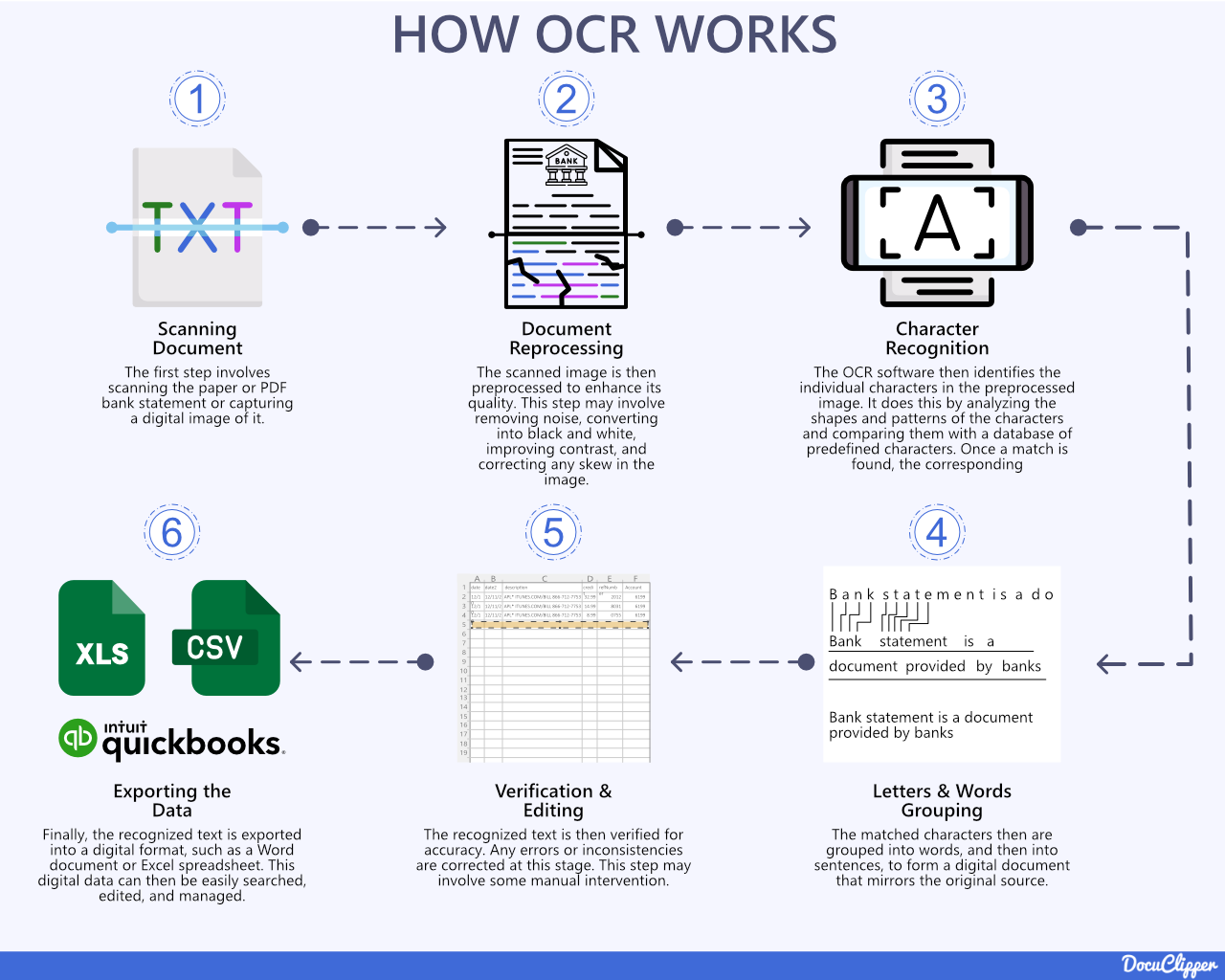
Image Courtesy: docuclipper
At its core, Optical Character Recognition (OCR) is a technology that converts images of text into machine-readable characters.
Think of a scanned receipt. To your eyes, it’s easy to read. To a computer, it’s just pixels. OCR bridges this gap by identifying shapes of letters and numbers, then converting them into digital text.
Example:
- Input: A scanned receipt shows: “TOTAL: $120.50”
- OCR Output: { “TOTAL”: “$120.50” }
This structured text can then be stored in a database, searched, or processed further.
OCR isn’t new. In fact, it dates back to the early 20th century, where it was used to help blind people read printed text through early mechanical recognition systems. Today, OCR powers everything from digitizing historical newspapers to enabling real-time translations in Google Translate’s camera app.
But OCR has a limitation: while it recognizes characters, it doesn’t understand context. It can read “120.50,” but it doesn’t know if that’s a price, a page number, or a date.
And this is where LayoutLMv3 enters the stage.
What is LayoutLMv3?
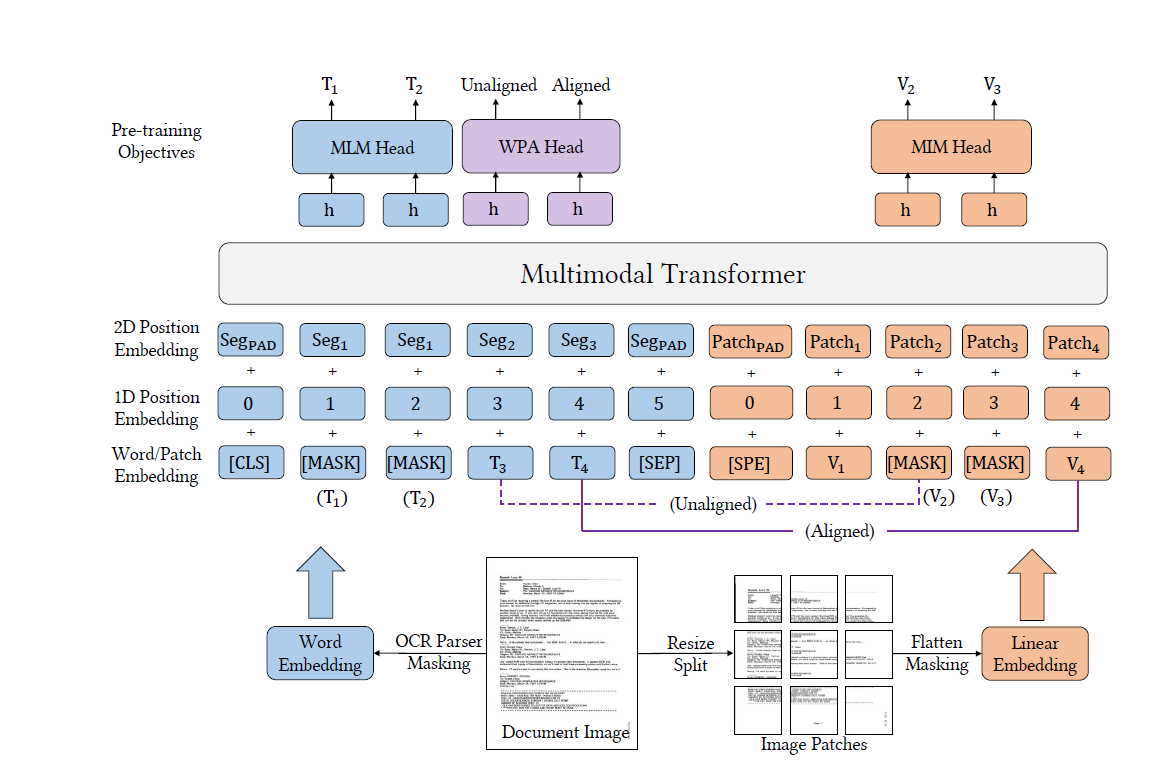
LayoutMV3 Architecture Image Courtesy: Huaweicloud
Developed by Microsoft, LayoutLMv3 is the third generation of the LayoutLM family of document AI models. It’s a multimodal transformer model, meaning it doesn’t just look at text — it simultaneously processes:
- Text embeddings – the content extracted via OCR.
- Layout embeddings – the positions and bounding boxes of the text in the document.
- Visual embeddings – the document image itself (logos, tables, fonts, etc.).
This triple-layer approach allows LayoutLMv3 to read a document the way humans do: by combining the words with their structure and visuals.
Example:
Take an invoice. OCR might extract:
Vendor: ABC Corp
Invoice No: 12345
Total: $120.50
But LayoutLMv3 can understand that “Total” at the bottom of the page refers to the final payable amount, while “12345” is linked to “Invoice No.” It builds contextual relationships.
That’s the difference between reading and understanding.
How They’re Connected
The connection between OCR and LayoutLMv3 is like the connection between eyes and brain:
- OCR = Eyes: It sees and extracts raw text.
- LayoutLMv3 = Brain: It interprets the meaning of the extracted text within context.
Pipeline Example:
- A scanned PDF is fed into an OCR engine.
- OCR extracts words, bounding boxes, and coordinates.
- LayoutLMv3 consumes the OCR output plus the original document image.
- The model outputs structured information, classifications, or answers to document-related questions.
This synergy forms the backbone of Intelligent Document Processing (IDP), which is already revolutionizing industries like banking, healthcare, and logistics.
Use Cases / Problem Statements That Can Be Solved
The combination of OCR and LayoutLMv3 addresses real-world bottlenecks in industries that rely heavily on documents. Let’s break down some high-value scenarios:
- Invoice & Receipt Processing
- Problem: Finance teams waste hours manually typing data from invoices into accounting systems. Errors lead to compliance issues.
- Solution: OCR extracts totals, invoice numbers, and vendor names. LayoutLMv3 understands the context (e.g., distinguishing “Subtotal” vs “Grand Total”).
- Impact: Automation reduces processing time by 90% and improves accuracy.
- Contracts & Legal Documents
- Problem: Legal professionals manually review hundreds of pages for specific clauses or risks.
- Solution: LayoutLMv3 can classify sections (e.g., “Termination Clause”) and summarize content.
- Impact: Saves law firms weeks of work and reduces human error in contract analysis.
- Healthcare Records
- Problem: Patient data is trapped in handwritten prescriptions and printed reports.
- Solution: OCR extracts medical terms, while LayoutLMv3 organizes them into structured patient records.
- Impact: Faster diagnosis, streamlined medical coding, and improved interoperability between hospitals.
- Banking & Insurance
- Problem: Onboarding customers involves verifying IDs, forms, and financial documents.
- Solution: OCR reads details from IDs, LayoutLMv3 validates relationships (e.g., ensuring the date of birth matches the applicant).
- Impact: Faster KYC (Know Your Customer) checks and quicker loan/claim processing.
- Government & Public Services
- Problem: Vast archives of census data, land records, and citizen applications remain locked in paper.
- Solution: OCR digitizes, while LayoutLMv3 structures the information for analysis and retrieval.
- Impact: Improved governance and citizen services.
- Education & Research
- Problem: Students and researchers struggle to search handwritten notes or scientific PDFs.
- Solution: OCR extracts content, LayoutLMv3 links formulas, captions, and figures for better understanding.
- Impact: Faster research insights and democratized access to knowledge.
Real-world Story: A global logistics company processes thousands of delivery receipts daily. With OCR + LayoutLMv3, it reduced data-entry errors by 85% and freed employees from repetitive typing, letting them focus on customer service.
Pros of OCR + LayoutLMv3
When OCR is combined with LayoutLMv3, the benefits stretch far beyond simple automation. Let’s explore them from different perspectives.
- Massive Efficiency Gains
- Business angle: Employees spend up to 30–40% of their time handling documents. Automating extraction and interpretation cuts this time drastically.
- Example: A finance team processing 10,000 invoices per month could save hundreds of hours of manual entry, reallocating resources to more strategic tasks.
- Impact: Faster workflows, reduced backlogs, and operational cost savings.
- Accuracy and Contextual Understanding
- Traditional OCR limitation: Misreads text when fonts are irregular, scans are low-quality, or formatting is complex.
- LayoutLMv3 enhancement: Understands that “TOTAL” is linked to a monetary amount, while “12345” is linked to an invoice number.
- Impact: Reduces misinterpretations that can cause financial or legal errors.
- Scalability and Enterprise Readiness
- Can process millions of pages daily when integrated into cloud or GPU-powered systems.
- Suitable for organizations with global operations, where documents are multilingual and multi-format.
- Versatility Across Domains
- Applicable in healthcare, banking, logistics, law, retail, government, and education.
- Works with invoices, contracts, handwritten prescriptions, receipts, insurance claims, research papers, and even old archives.
- Better Searchability & Data Democratization
- Converts static PDFs into structured, searchable databases.
- Example: A legal firm can instantly find every instance of a “termination clause” across thousands of contracts.
- Compliance & Audit Readiness
- Structured digital records reduce the risk of missing data during audits.
- Easier to comply with data retention laws, industry standards, and regulatory frameworks.
Challenges of OCR + LayoutLMv3
No technology is perfect. OCR + LayoutLMv3 also has practical, technical, and organizational challenges.
- Dependence on OCR Quality
- Poor-quality scans, skewed images, faded ink, or messy handwriting reduce OCR accuracy.
- LayoutLMv3 relies heavily on OCR outputs, so “garbage in = garbage out.”
- Example: In healthcare, misinterpreting a prescription dosage could be catastrophic.
- High Computational & Infrastructure Costs
- LayoutLMv3 is a transformer model with millions of parameters. Running it at scale requires:
- High-performance GPUs/TPUs.
- Cloud costs that can escalate for enterprises.
- Example: A bank processing millions of ID documents may see operational costs spike if not optimized.
- Integration Complexity
- Organizations must build pipelines combining:
- OCR engines → Preprocessing → LayoutLMv3 → Downstream applications.
- Requires skilled AI engineers, ML ops pipelines, and cloud infrastructure.
- Privacy and Security Concerns
- Documents often contain sensitive data (financial records, health records, government IDs).
- Hosting them on third-party clouds may raise GDPR, HIPAA, and CCPA compliance risks.
- On-premises solutions solve this but add infrastructure burden.
- Limited Generalization
- LayoutLMv3 works best when fine-tuned on domain-specific datasets (e.g., invoices, receipts, forms).
- Without fine-tuning, results may be suboptimal in niche industries.
- Human Oversight Still Needed
- AI-driven document processing is powerful, but errors can still happen.
- Enterprises need human-in-the-loop (HITL) systems for quality assurance.
Alternatives to OCR + LayoutLMv3
While OCR + LayoutLMv3 is currently a leading approach, other options exist — each with its strengths, weaknesses, and target use cases.
- Traditional OCR-only Tools
- Examples: Tesseract, EasyOCR.
- Pros: Free, lightweight, open-source.
- Cons: Extracts only raw text, no contextual understanding.
- Use case: Small businesses needing low-cost digitization.
- Commercial Document AI APIs
- Examples: Google Document AI, AWS Textract, Azure Form Recognizer.
- Pros: Easy to integrate via APIs, often bundled with cloud ecosystems.
- Cons: Costly at scale, vendor lock-in, potential privacy concerns.
- Use case: Startups or mid-sized firms that prefer speed of deployment over customization.
- Other Document AI Models
- Donut (NAVER AI Lab)
- OCR-free approach: Directly learns from images without OCR.
- Pros: Removes dependency on OCR quality.
- Cons: Still relatively new, requires large training datasets.
- DocFormer (Amazon)
- Combines visual + textual features in documents.
- Tailored for enterprise-level applications.
- TrOCR (Microsoft)
- Transformer-based OCR model.
- More advanced than traditional OCR but not as context-aware as LayoutLMv3.
- Hybrid Human + AI Systems
- AI handles extraction and classification.
- Humans review high-risk or ambiguous outputs.
- Ideal for industries like law and healthcare where 100% accuracy is critical.
Industry Insights & Upcoming Trends
The document AI industry is evolving rapidly, with several emerging trends shaping its future:
- OCR-Free Models are Rising
- Traditional OCR may be replaced by end-to-end AI models like Donut that directly parse documents.
- Benefit: Eliminates errors introduced in OCR stage.
- Generative AI for Documents
- Beyond extracting information, AI will generate summaries, structured reports, or insights.
- Example: Instead of just identifying invoice totals, AI could generate an entire financial dashboard from scanned invoices.
- Edge Computing & Privacy-first AI
- Growing demand for running OCR + LayoutLMv3 on local or edge devices.
- Critical in healthcare, defense, and government sectors where cloud is restricted.
- Multimodality Expansion
- LayoutLMv3 already integrates text, layout, and images.
- Future models may also integrate speech, handwriting styles, and video context for even richer understanding.
- Industry-specific Pretrained Models
- Expect pre-trained variants specialized for:
- Healthcare (medical notes, prescriptions).
- Finance (bank statements, contracts).
- Legal (case documents, evidence files).
- Sustainability Considerations
- Running transformer models consumes significant energy.
- New research is focusing on energy-efficient AI to make document AI greener.
Project References
Frequently Asked Questions
Q1: Can OCR work without LayoutLMv3?
Yes. OCR alone can extract text, but it won’t understand context, layout, or visual cues.
Q2: Do I always need OCR before using LayoutLMv3?
Usually, yes. LayoutLMv3 relies on OCR output for text embeddings. Some newer approaches (like Donut) skip OCR, but they’re still experimental.
Q3: Is LayoutLMv3 open-source?
Yes. Microsoft provides pretrained LayoutLMv3 models via Hugging Face.
Q4: Can LayoutLMv3 handle handwritten documents?
It can, but accuracy depends heavily on OCR’s ability to recognize handwriting.
Q5: Is it production-ready for enterprises?
Yes, many companies use OCR + LayoutLMv3 in workflows, but you’ll need proper infrastructure (cloud/GPU).
Third Eye Data’s Take
From dusty file cabinets to endless PDFs, the way we manage documents is evolving. OCR was the first big step — giving machines the ability to read. But now, with LayoutLMv3, machines don’t just read; they understand documents in context.
For businesses, this shift means fewer errors, lower costs, faster workflows, and smarter data-driven decisions. From banks to hospitals to startups, the opportunities are massive.
If your organization is still manually processing documents, now is the time to explore OCR + LayoutLMv3. With the right strategy, you can transform unstructured data into a goldmine of insights.
Broad takeaway: OCR + LayoutLMv3 is powerful but not perfect. Organizations need to weigh pros and cons, consider alternatives, and keep an eye on industry trends like OCR-free AI and generative document intelligence.