Azure Container Apps: The “Easy Button” for Cloud-Native Superpowers
Imagine you’re a developer who needs to ship applications fast, scale effortlessly, and use the latest cloud-native patterns like microservices and event-driven architectures. You know Kubernetes (K8s)is the engine for all this power, but managing it feels like maintaining a Formula 1 race car—you need a full pit crew (DevOps team) just to keep the tires inflated.
That’s the core struggle of the cloud-native era: immense potential locked behind immense complexity.
Enter Azure Container Apps (ACA).
The ACA Philosophy: Power Without the Pit Crew
Azure Container Apps is Microsoft’s elegant, fully managed serverless container platform. Think of it as the ultimate compromise: it gives you the raw scalability and power of Kuberneteswithout forcing you to deal with the cluster, the nodes, the networking, or the control plane.
ACA is essentially a PaaS (Platform as a Service)layer built on top of the robust Azure Kubernetes Service (AKS)and Azure Functions infrastructure. It’s the “Goldilocks zone” for container deployments—simpler than raw AKS, but far more powerful and container-centric than Azure App Service.
The Engine Under the Hood: The Trifecta of Power
ACA is a certified cloud-native heavyweight because it natively supports:
- Docker Containers:Deploy any image from any OCI-compliant registry (ACR, Docker Hub, etc.).
- KEDA (Kubernetes Event-driven Autoscaler):The genius that lets your app scale from zero to a thousand instances based on external events, not just HTTP traffic.
- Dapr (Distributed Application Runtime):A standardized API for building resilient, stateful, and observable microservices, giving you features like service discovery and pub/sub messaging without writing complex boilerplate code.
The “Why Now?” Use Cases
When is ACA the right tool for your cloud-native arsenal? It’s the perfect fit for these complex challenges:
- Microservices Architecture:Deploying tiny, independent services that need to talk securely? ACA handles the orchestration, and Daprmanages the service invocation and resilient pub/sub communication for you.
- Event-Driven & Serverless Workloads:Need a background worker that only spins up when a new message hits a queue? KEDAintegrates with Azure Service Bus, Event Hub, Kafka, or custom metrics to provide true, cost-saving, event-driven scaling.
- Real-Time APIs and Web Backends:Host your RESTful APIs with built-in HTTPS, custom domains, and multi-revision (canary/blue-green) deploymentsfor zero-downtime rollouts.
- Data Processing Pipelines (ETL):Run containerized data transformation processes that integrate seamlessly with Azure Data Lake, Synapse Analytics, and Cosmos DB.
- Machine Learning Inference:Deploy lightweight ML models for real-time prediction APIs. ACA’s auto-scaling based on request load ensures your compute costs stay low when traffic is sporadic.
- Multi-Environment DevOps:Easily create isolated environments for Dev, Test, and Production that integrate directly with Azure DevOpsor GitHub Actions for CI/CD.
- Secure Hybrid & Edge:Leverage Azure Arcto deploy and manage your ACA containers consistently across on-premises servers or edge locations, extending the serverless model outside the public cloud.
The Pro-Level Advantages (The Gains)
ACA isn’t just simpler; it fundamentally changes the economic and operational model of container deployments.
Top-Tier Cost and Management Benefits:
| Feature | Technical Benefit | Human Translation |
| Serverless Container Orchestration | Abstracts away node, cluster, and Kubernetes control plane management. | You focus 100% on code; Azure handles the infrastructure maintenance and patching. |
| Flexible Scaling with KEDA | Scales dynamically based on HTTP, CPU/memory, or external event triggers(e.g., queue depth, Kafka lag). | Optimal cost efficiency; your app only consumes resources when it has work to do. |
| Built-In Zero to Scale | Applications automatically scale down to zero instanceswhen idle. | Massive cost savings for night-time or sporadic workloads. |
| Multi-Revision Deployments | Supports traffic-splitting for blue/greenand canary rollouts, plus quick rollbacks. | Deployment anxiety gone; test new versions safely with a fraction of user traffic before a full launch. |
| Integrated Dapr Support | Simplifies state management, service invocation, and resiliency patterns with standard APIs. | Faster microservices development; you get enterprise-grade features for free. |
| Ecosystem Integration | Deeply integrates with Azure Monitor, Application Insights, Log Analytics, Key Vault,and Event Grid. | Full visibility and iron-clad security/credential management right out of the box. |
The Architect’s Caveats (The Trade-offs)
No platform is perfect. ACA trades a degree of control for its simplicity, which an architect must consider.
- Loss of Fine-Grained Kubernetes Control:This is the core trade-off. You cannotaccess advanced K8s features like custom CRDs (Custom Resource Definitions)or granular Network Policies. If your application mustmanipulate the K8s cluster directly, you need full AKS.
- Cold Start Latency:When an application has scaled down to zero, the first request will incur a slight delay (latency) while the container spins up. This is typical for any true serverless model.
- Stateful Workload Limitations:ACA is best suited for stateless applications. Stateful services (those that need persistent internal storage) will require external Azure services like Cosmos DBor Azure Cache for Redisfor persistence.
- Pricing Dynamics:While usually cost-effective, the cost model in highly dynamic, event-driven scenarios can be complex to precisely forecast due to the variable consumption model.
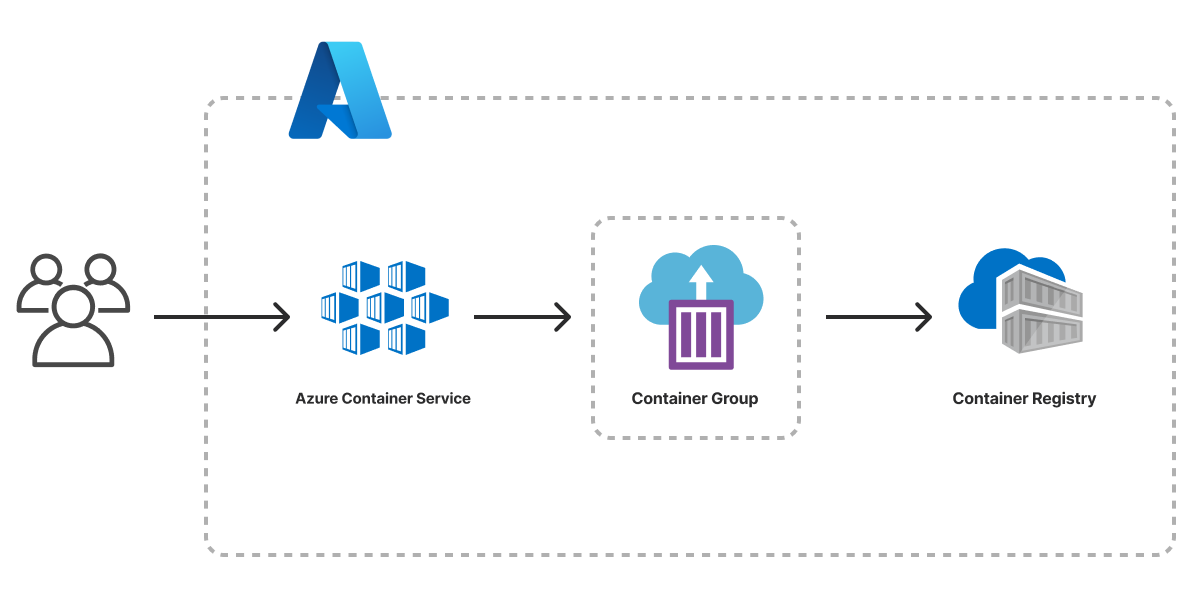
Architecture_of_Deployment
Image Courtesy:pulumi.com
Industry Insights & The Road Ahead
Microsoft isn’t resting on its laurels; ACA is a high-priority platform:
- Enhanced Networking:Recent updates now allow VNet (Virtual Network) integration, enabling secure, private communicationbetween microservices and private Azure PaaS databases (like private link-enabled SQL/Cosmos DB).
- AI/ML Compute:GPU supportis being rolled out, making ACA viable for high-performance ML inference workloads that need specialized hardware.
- Hybrid Consistency:Deeper Azure Arcintegration ensures that corporate governance and consistent policy enforcement are applied whether your container runs in the cloud or on-premises.
The Final Verdict: ThirdEye Data’s Architectural Touch
At ThirdEye Data, we see Azure Container Apps not just as a technology, but as a strategic acceleratorfor modern, container-based development.
It successfully bridges the chasm that has long existed between simplicity and power—delivering Kubernetes-level scalability and resiliencewithout the steep DevOps overheador the constant toil of cluster maintenance.
For organizations strategically adopting microservices, launching AI-driven inference APIs, or building elastic, event-driven data pipelines, ACA provides the perfect synthesis: serverless convenience, cost optimization through scaling to zero, and enterprise-grade integration across the Azure ecosystem.
Its native synergy with critical Azure services—like Event Hub, Key Vault, Monitor, and Synapse—makes it the obvious, friction-free choice for businesses already anchored in the Azure cloud.
ThirdEye Data recommends Azure Container Apps as the future-ready foundation for application teams that want to accelerate innovation, simplify their operations, and fully harness cloud-native architectures—without the distraction of managing Kubernetes complexity.
Frequently Asked Questions:
- How does ACA handle orchestration under the hood?
ACA runs on managed Kubernetes (AKS)with KEDAfor scaling. Each Container App deployment creates a revision, which maps to one or more pods managed by the cluster. Developers don’t manage nodes or pods directly—everything is abstracted through revisions and the ACA environment.
- What is the internal architecture of ACA?
- Environment:Logical isolated cluster for one or more container apps.
- Container App:The deployed container instance, potentially with multiple replicas.
- Revision:Immutable snapshot of a deployment for traffic routing and rollback.
- Ingress Controller:Handles HTTP/HTTPS routing, TLS termination, and optional internal-only access.
- KEDA-based scaler:Monitors metrics and triggers scaling events.
- Optional Dapr sidecar:Adds service-to-service communication, state management, and pub/sub messaging.
- How does scaling work?
- ACA supports metric-based scaling(CPU, memory, concurrency) and event-driven scaling(queues, event hubs, custom metrics).
- Supports scale-to-zerowhen no traffic is present, minimizing costs.
- Scaling decisionsare made by KEDA based on configured thresholds and observed metrics.
- Max replica limitscan be set to control resource consumption.
- How is networking and ingress managed?
- Managed ingresswith automatic HTTPS/TLS.
- Optional internal-only networkingvia VNet integration.
- Traffic splitting between revisionsallows canary deployments and gradual rollouts.
- Service-to-service communicationcan be secured using Dapr mTLS or private networking.
- How is state handled given ephemeral containers?
- Containers are stateless, and local storage is ephemeral.
- Persistent storage must be external: Azure Blob Storage, Cosmos DB, SQL Database, or other managed stores.
- Dapr can provide state store abstraction for transactional microservices patterns.
- How are secrets and environment configurations managed?
- Secrets can be injected from Azure Key Vaultor environment variables.
- Secrets are encrypted at rest and only exposed in memory to containers.
- Configuration can be updated dynamically without redeploying the container, except for certain secret rotations.
- How are deployments and revisions handled?
- Every deployment generates a new revision.
- Revisions are immutable, enabling rollbacksby routing traffic back to a previous revision.
- Traffic can be splitbetween revisions for canary testing, blue/green deployments, or phased rollouts.
- How is observability implemented?
- Metrics include CPU, memory, replica count, HTTP request latency, and scaling events.
- Logs are collected from containers via Azure Monitor and Log Analytics.
- Optional Dapr sidecar observabilityprovides distributed tracing, pub/sub metrics, and state interactions.
- Alerts and scaling logs allow detection of performance issues and anomalies.
- How is security enforced?
- Network isolationvia VNet integration and private endpoints.
- Managed identitiesallow secure access to Azure services.
- Secrets are encrypted at rest and in transit.
- Container images can be scanned for vulnerabilities in Azure Container Registry before deployment.
- Dapr mTLS provides secure communication between microservices when enabled.
- What advanced DevOps and production patterns does ACA support?
- Blue/Green deploymentsand canary testingthrough traffic split between revisions.
- CI/CD pipelinesintegrate with GitHub Actions or Azure DevOps for automated build, deploy, and monitoring workflows.
- Scaling alerts and observability pipelinesenable automated rollback or scaling adjustments based on runtime metrics.
- Environment isolationallows separate staging, QA, and production deployments without interference.
The Takeaway
Azure Container Apps is the DevOps accelerator. It delivers the powerful, flexible architecture teams want—microservices, eventing, state patterns—without the Kubernetes operations tax. For any organization invested in Azure that needs enterprise-grade security, deep platform integration, and world-class auto-scaling, ACA is no longer an alternative—it’s the recommended starting point for cloud-native innovation.