From Startup Dreams to Global Scale: How Google Kubernetes Engine (GKE) Powers the Future of Cloud-Native Apps
It’s a familiar story in the tech world.
You’ve spent months building your app. You’ve tested every feature, polished every pixel, and finally—launch day arrives. The buzz is electric. Users flood in. Your team is celebrating. Then… the servers crash.
Not because your code failed. But because your infrastructure wasn’t ready to scale.
This is the turning point for many developers and CTOs. The moment they realize that building a great app isn’t enough—you need infrastructure that’s resilient, scalable, and smart. That’s where Google Kubernetes Engine (GKE)comes in.
Google Kubernetes Engine (GKE) Overview: What It Is and Why It Matters
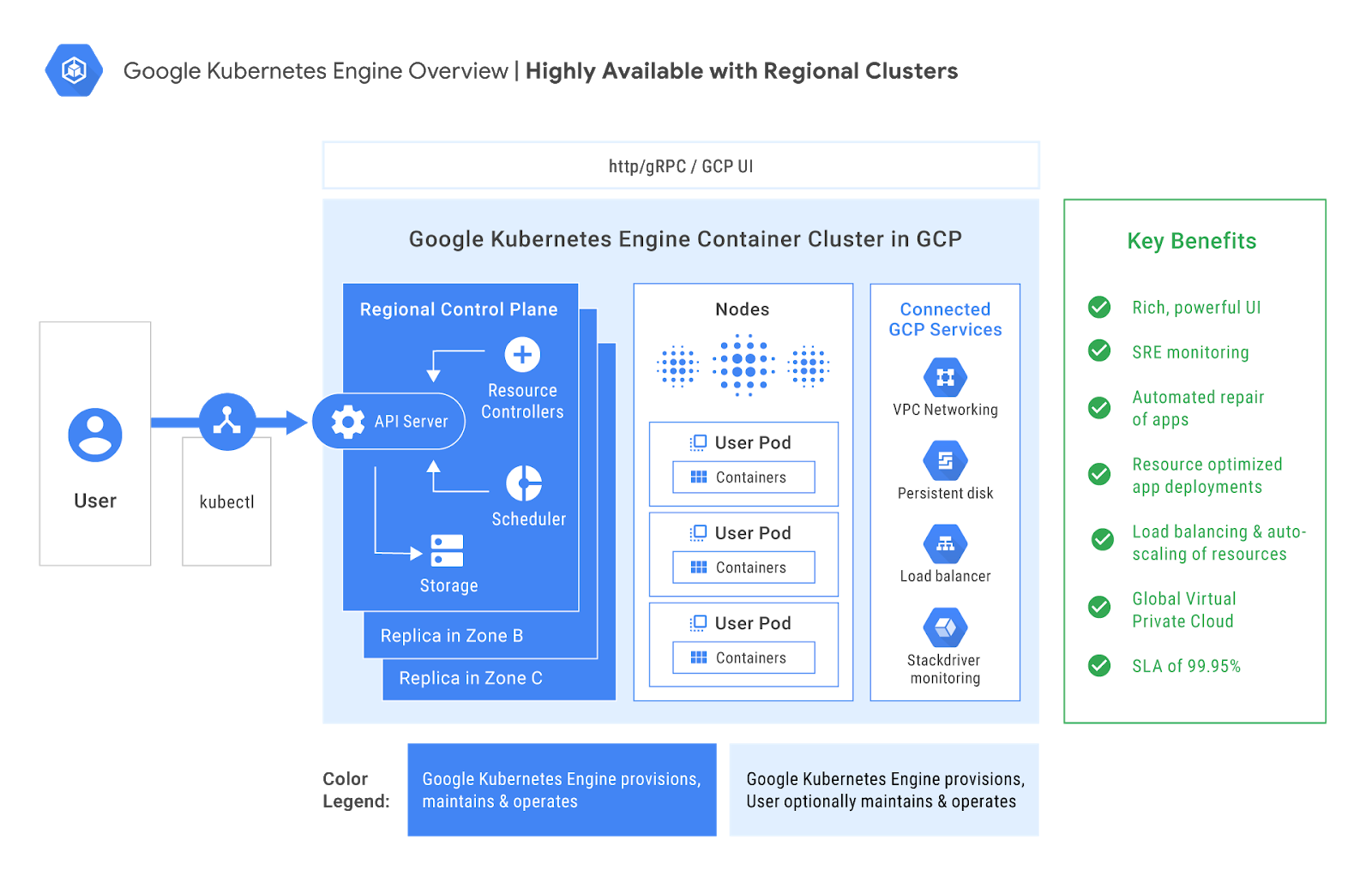
Image Courtesy: Infoq
Google Kubernetes Engine (GKE)is a fully managed Kubernetes service offered by Google Cloud Platform (GCP). It’s built on Kubernetes—the open-source container orchestration system originally developed by Google—and it brings Google’s battle-tested infrastructure to your fingertips.
Architecture and Modes
GKE offers two distinct operational modes:
- Autopilot Mode: This is Google’s “hands-off” approach. You don’t manage nodes or worry about infrastructure. Google handles everything—from provisioning to scaling to patching. You simply define your workloads and let GKE do the rest.
- Standard Mode: For teams that need granular control. You manage the nodes, configure networking, and fine-tune performance. It’s ideal for complex workloads, legacy migrations, or hybrid cloud setups.
Both modes share the same core benefits: scalability, reliability, and deep integration with GCP services.
Core Features
- Automatic Scaling: GKE adjusts resources based on demand—no manual intervention required.
- Self-Healing: If a node fails, GKE replaces it. If a pod crashes, it restarts automatically.
- Integrated Monitoring: Native support for Prometheus, Grafana, and Google Cloud Observability.
- Security: Role-Based Access Control (RBAC), network policies, hardened OS images, and policy enforcement.
- CI/CD Integration: Seamless with Cloud Build, Cloud Deploy, and GitOps workflows.
- Multi-Zone & Regional Clusters: Built-in high availability and disaster recovery.
GKE is designed for developers, operators, and architects who want to build resilient applications without reinventing the wheel.
Use Cases: Real Problems Solved by Google Kubernetes Engine (GKE)
Let’s explore how GKE solves real-world challenges across industries and roles.
The Startup CTO
Scenario: Your app just went viral. Traffic is surging. Your backend is melting.
GKE Solution: Auto-scaling kicks in. Pods multiply to handle the load. Your app stays online. You don’t need to touch a single server. It’s like having an invisible team of engineers scaling your infrastructure in real time.
The Enterprise Architect
Scenario: You’re migrating a legacy monolith to microservices. It’s a tangled mess of dependencies.
GKE Solution: Kubernetes’ service discovery and GKE’s networking features untangle the mess. Each service gets its own container, its own lifecycle, and its own scaling policy. You move from chaos to clarity.
The ML Engineer
Scenario: You’re training models on massive datasets. It’s slow, expensive, and hard to manage.
GKE Solution: Spin up GPU-enabled nodes. Integrate with TensorFlow and Vertex AI. Run distributed training jobs across clusters. Deploy models as containerized services. GKE turns your ML pipeline into a production-grade system.
The Global DevOps Team
Scenario: Your team is distributed across time zones. Manual deployments are error-prone and slow.
GKE Solution: CI/CD pipelines with Cloud Build and Cloud Deploy automate everything. Rollouts happen while you sleep. Rollbacks are instant. Your team moves faster, with fewer mistakes.
The Data Engineer
Scenario: You’re building real-time data pipelines. Latency is killing your insights.
GKE Solution: Deploy stream processors like Apache Beam or Flink on GKE. Integrate with Pub/Sub and BigQuery. Scale dynamically based on data volume. Your insights arrive in seconds, not hours.
Pros of Google Kubernetes Engine (GKE): Why Developers Love It
GKE isn’t just powerful—it’s developer-friendly. Here’s why it’s winning hearts across the tech landscape:
- Effortless Scaling
GKE’s auto-scaling features are like having a smart thermostat for your infrastructure. It adjusts resources based on demand, ensuring performance without waste.
- Self-Healing Infrastructure
Failures happen. GKE doesn’t panic—it repairs. Nodes are replaced automatically. Pods are rescheduled. Your app stays healthy, even when the underlying hardware isn’t.
- Security Built-In
GKE includes hardened OS images, RBAC, network policies, and policy controllers. It’s designed with zero-trust principles and integrates with Google’s security suite.
- Observability and Monitoring
With built-in support for Prometheus, Grafana, and Google Cloud Monitoring, GKE gives you deep visibility into your system. You can track metrics, set alerts, and debug issues in real time.
- Cost Efficiency
In Autopilot mode, you only pay for the compute resources your running Pods request. No idle nodes. No wasted spend. It’s cloud economics done right.
- Seamless Integration with GCP
GKE works beautifully with BigQuery, Cloud Storage, Pub/Sub, and other GCP services. You can build end-to-end solutions without leaving the ecosystem.
Cons of Google Kubernetes Engine (GKE): The Flip Side
No tool is perfect. Here’s where GKE might challenge you:
- Steep Learning Curve
Kubernetes is powerful but complex. GKE simplifies it, but there’s still a lot to learn—especially for teams new to container orchestration.
- Cost Complexity
Pricing can be opaque, especially in Standard mode. You need to monitor usage closely to avoid surprises.
- Limited Customization in Autopilot
Autopilot mode is great for simplicity, but it restricts low-level configurations. If you need deep control over nodes or networking, you’ll need Standard mode.
- Migration Challenges
Moving workloads from other platforms to GKE can be tricky. Expect some refactoring, especially if you’re coming from a VM-based architecture.
- Documentation Gaps
While Google’s docs are extensive, some users report inconsistencies and lack of clarity—especially for advanced features.
Alternatives to Google Kubernetes Engine (GKE): What Else Is Out There?
If GKE doesn’t fit your needs, here are other platforms to consider:
| Platform | Best For | Why |
| Amazon EKS | AWS-heavy teams | Deep integration with AWS services |
| Azure AKS | Microsoft shops | Seamless with Azure DevOps and Active Directory |
| Red Hat OpenShift | Hybrid cloud | Enterprise-grade features and support |
| Rancher | Multi-cluster setups | Lightweight and flexible |
| Docker Swarm | Small teams | Simple and quick to deploy |
Each has its strengths. But GKE stands out for its balance of power, simplicity, and integration.
🔮Industry Insights: Where GKE Is Headed
GKE is evolving rapidly. Here’s what’s coming:
- Anthos Integration: Hybrid and multi-cloud deployments are becoming seamless.
- AI-Native Infrastructure: GKE is optimizing for ML workloads with better GPU scheduling and TensorFlow support.
- Security Enhancements: Expect tighter policy enforcement and real-time vulnerability scanning.
- Serverless Expansion: Knative and Cloud Run are bridging the gap between containers and functions.
Industry analysts predict that GKE will play a central role in AI-native infrastructure, especially as enterprises adopt LLMs and real-time data pipelines.
Project References of Google Kubernetes Engine (GKE)
Frequently Asked Questions of Google Kubernetes Engine (GKE)
Q: Is GKE good for beginners?Yes—Autopilot mode is perfect for getting started without deep Kubernetes knowledge.
Q: Can I use GKE for machine learning?Absolutely. GKE supports GPU nodes and integrates with ML tools like TensorFlow and Vertex AI.
Q: What’s the difference between Autopilot and Standard mode?Autopilot is fully managed. Standard gives you full control. Choose based
Third Eye Data’s Take on Google Kubernetes Engine (GKE)
We believe GKE is a foundational building block for scalable, reliable AI deployments. When we deploy AI/ML workloads — especially for computer vision pipelines that ingest, preprocess, infer, and postprocess — we benefit greatly from container orchestration, autoscaling, and managed infrastructure that GKE offers.
- Strengths: GKE allows us to deploy microservices (data ingestion, model inference, monitoring) separately, scale them independently, and manage rolling updates without downtime. This aligns deeply with our approach: modular pipelines.
- Challenges: Managing GKE clusters, permissions, networking & costs can become complex for enterprises. We have to monitor cluster costs, optimize node usage. For smaller POCs, Kubernetes overhead might not always be worth it.
- Where we use it: For production-grade deployment after POC / prototype phases, especially when we need reliability, scaling, or multiple microservices.
Ready to get started with GKE? Explore Google Cloud’s GKE Quickstart Guide
- Try Autopilot mode for free and deploy your first container in minutes
- Subscribe to our newsletter for more cloud-native insights and tutorials