Rasterio: Making Geospatial Data Easy in Python
Imagine trying to read a satellite image, but the pixels are scattered across multiple files with different coordinate systems. Now imagine being able to open that image, analyze it, and perform spatial operations with just a few lines of Python code. This is the magic of Rasterio — a Python library that makes working with raster geospatial data intuitive, efficient, and powerful.
Whether you’re mapping deforestation, analyzing urban growth, or monitoring crop health, Rasterio is the bridge between raw geospatial data and actionable insights. In this article, we’ll explore Rasterio in detail: what it is, how it works, its applications, pros and cons, alternatives, industry trends, and real-world projects — all in a storytelling, blog-friendly tone.
Rasterio Overview
What Is Rasterio?
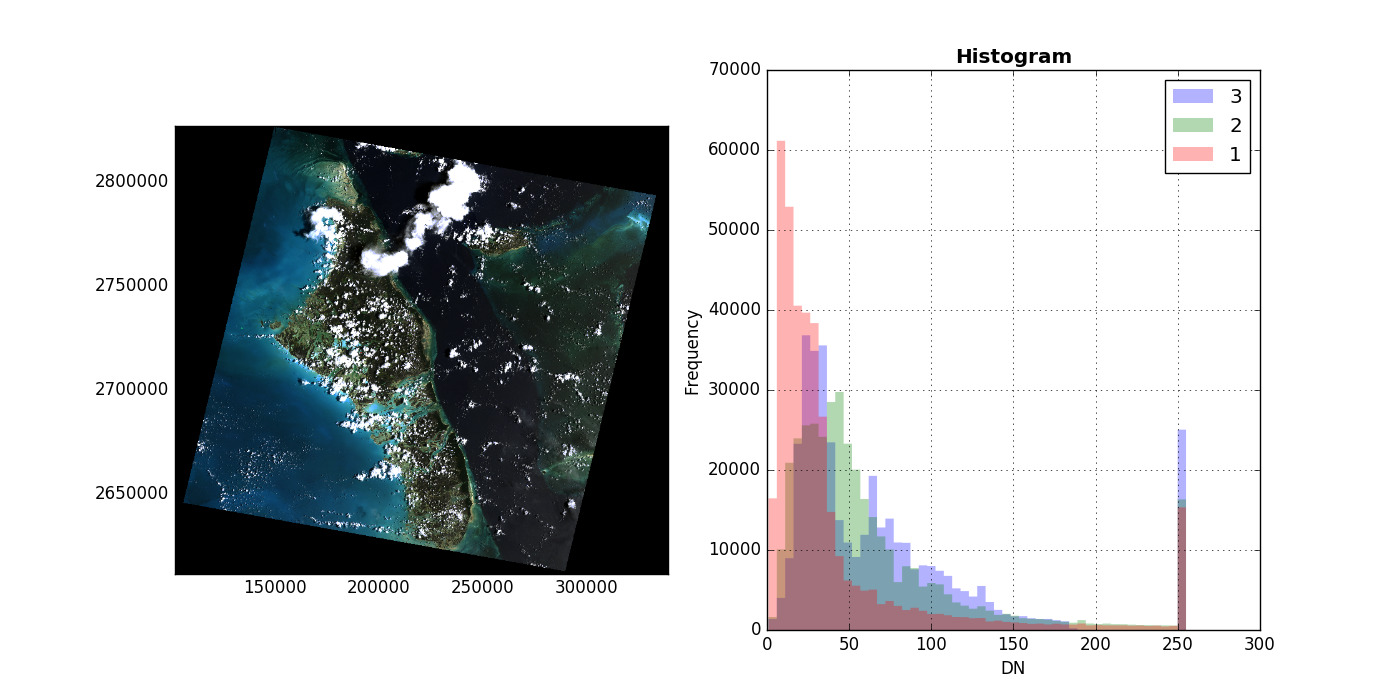
Image Courtesy: Rasterio readthedocs
Rasterio is a Python library built on top of GDAL, designed to make raster data manipulation simpler and more Pythonic. Raster data represents spatial information as grids of pixels, where each pixel contains a value representing some measurement — like elevation, temperature, or satellite imagery reflectance.
Rasterio allows users to:
- Read and write raster files efficiently
- Transform coordinate reference systems (CRS)
- Perform spatial masking and cropping
- Analyze and manipulate raster values with NumPy
In short, Rasterio combines the power of GDAL with Python’s simplicity, making geospatial raster analysis accessible to developers, data scientists, and GIS professionals.
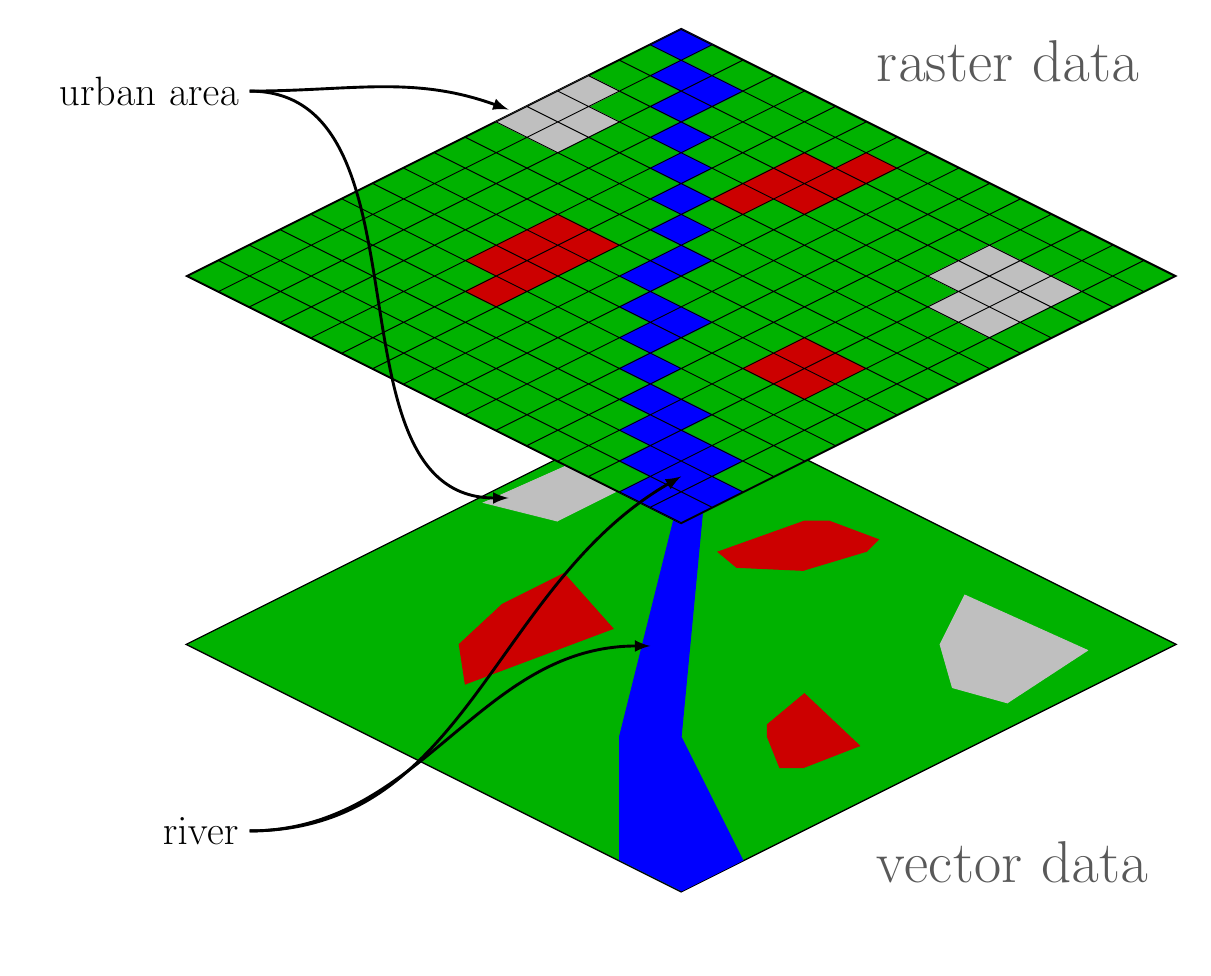
Image Courtesy: equatorstudios
History and Purpose
Rasterio was first released in 2014 as part of the Mapbox open-source geospatial ecosystem. Its main goal was to provide a Pythonic API for raster operations, making GDAL’s functionality easier to use without losing performance or flexibility.
Why Rasterio Matters
- Python Integration: Works seamlessly with NumPy, Pandas, and other Python data libraries.
- Ease of Use: Simplifies complex raster operations into intuitive functions.
- Performance: Built on GDAL, offering speed and support for multiple formats.
- Community Support: Open-source and actively maintained, with tutorials, documentation, and examples.
How Rasterio Works
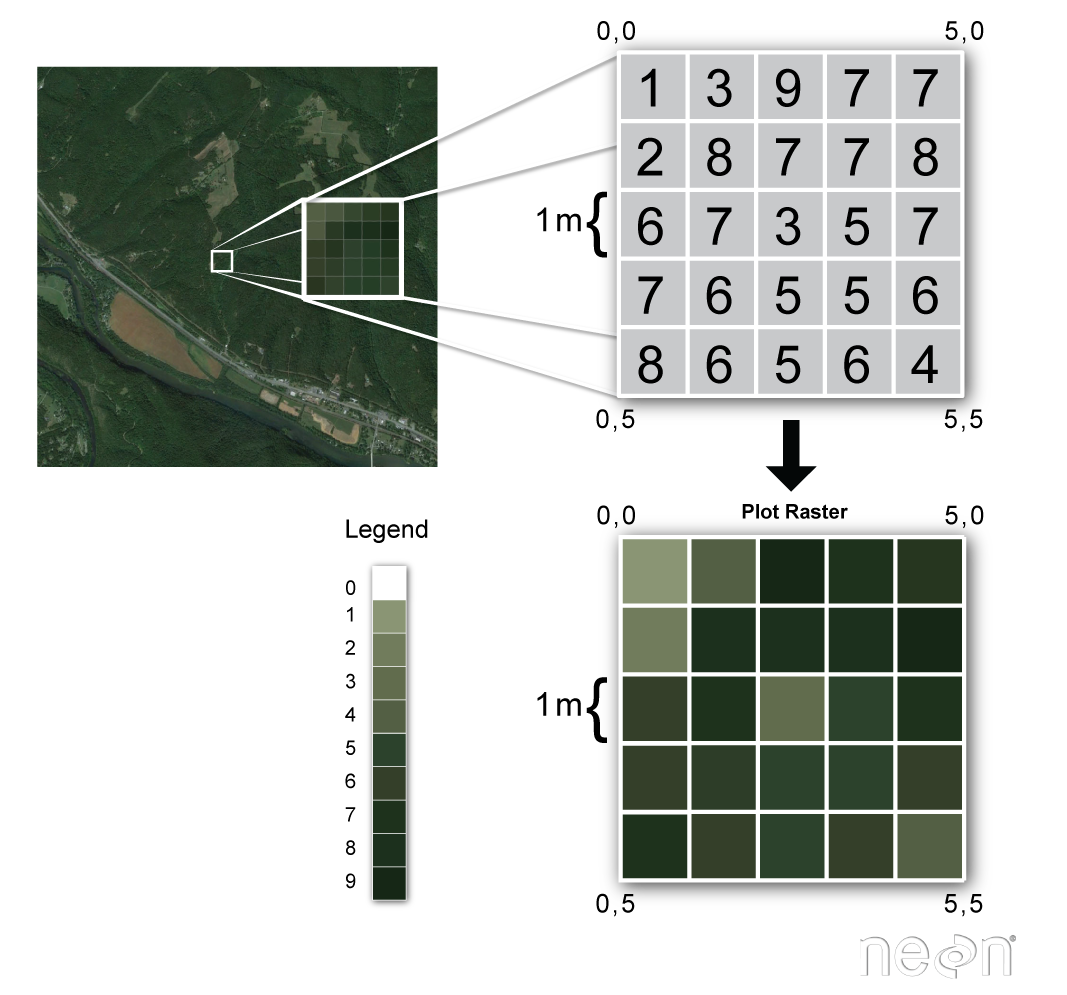
Image Concept: datacarpentry
Rasterio is designed to work intuitively with Python’s data ecosystem. Let’s break down its key components and workflows.
1. Reading Raster Data
Rasterio allows you to open raster files like GeoTIFFs with simple Python code:
import rasterio
with rasterio.open(“example.tif”) as src:
data = src.read(1) # read first band
- Supports various formats: GeoTIFF, JPEG2000, HDF, NetCDF, and more
- Reads metadata, CRS, bounds, and resolution of datasets
- Handles multi-band imagery, essential for satellite analysis
2. Writing and Creating Rasters
You can create new raster datasets from scratch or from arrays:
import numpy as np
with rasterio.open(
“output.tif”,
“w”,
driver=”GTiff”,
height=data.shape[0],
width=data.shape[1],
count=1,
dtype=data.dtype,
crs=src.crs,
transform=src.transform,
) as dst:
dst.write(data, 1)
- Supports writing single-band or multi-band rasters
- Preserves geospatial metadata, CRS, and affine transformations
3. Coordinate Reference System (CRS) Transformations
Rasterio allows you to reproject rasters to any CRS:
- Transform rasters to match other datasets for analysis
- Perform resampling for pixel alignment
- Ensure consistency in multi-source data workflows
4. Spatial Masking and Cropping
Rasterio supports masking rasters using vector geometries:
- Extract areas of interest from large datasets
- Combine raster and vector data in Python workflows
- Essential for urban planning, deforestation monitoring, and agriculture
5. Integration with Python Data Libraries
Rasterio works seamlessly with NumPy, Pandas, and Matplotlib:
- Convert raster data into arrays for statistical analysis
- Visualize raster data quickly using Matplotlib or Folium
- Combine raster and tabular data for machine learning pipelines
Use Cases / Problem Statements Solved with Rasterio
Rasterio is versatile and solves a variety of geospatial problems:
1. Remote Sensing and Satellite Analysis
- Problem: Satellite imagery comes in large, complex files with multiple bands.
- Solution: Rasterio reads multi-band images, extracts regions of interest, and converts them into arrays for analysis.
- Example: Compute NDVI for crop health monitoring using Landsat or Sentinel imagery.
2. Urban Planning and Infrastructure
- Problem: City planners need high-resolution spatial data for zoning and infrastructure planning.
- Solution: Rasterio enables reprojecting and cropping of datasets, integrating satellite and aerial imagery into GIS workflows.
- Example: Monitor urban sprawl or identify areas for new construction.
3. Environmental Monitoring
- Problem: Tracking deforestation, flooding, or climate change requires consistent geospatial datasets over time.
- Solution: Rasterio automates reading, reprojection, and masking of raster layers for time-series analysis.
- Example: Quantify forest loss using Landsat imagery over multiple years.
4. Agriculture and Crop Monitoring
- Problem: Farmers and agronomists need precise insights into crop health.
- Solution: Rasterio extracts spectral indices from multispectral images, integrates with GIS layers, and outputs actionable insights.
- Example: NDVI, EVI, or soil moisture estimation from satellite or drone imagery.
5. Navigation and GIS Integration
- Problem: GPS systems require accurate elevation models and raster maps.
- Solution: Rasterio reads, reprojects, and converts DEMs and raster maps for integration into routing and navigation systems.
Pros of Rasterio
- Pythonic and Intuitive: Easier to use than raw GDAL commands
- Integration with Data Science Tools: Works with NumPy, Pandas, Matplotlib
- Supports Multiple Formats: Reads and writes many raster formats
- Preserves Geospatial Metadata: CRS, transform, bounds, and projection
- Open Source: Free, well-maintained, and actively supported
- Automation-Friendly: Ideal for batch processing and scripting
Cons / Limitations
- Raster Only: Vector data requires integration with Fiona or Shapely
- Memory Intensive: Very large rasters may need optimization or chunking
- Learning Curve: Users need basic understanding of CRS, affine transforms, and raster operations
- Limited GUI Support: Works best in Python scripts, notebooks, or integrated GIS software
Alternatives to Rasterio
- GDAL: The underlying library Rasterio wraps; more complex but highly flexible
- Rasterio + Fiona + Shapely: Full Python ecosystem for raster and vector workflows
- ArcPy (ArcGIS): Proprietary solution with extensive GUI support
- Google Earth Engine: Cloud-based raster processing for large datasets
- R Raster Package: Equivalent functionality in R for statistical computing
Upcoming Updates / Industry Insights
- Cloud Integration: Rasterio now supports cloud-optimized GeoTIFFs (COGs) for efficient remote access
- High-Performance Computing: Integration with Dask and xarray allows parallelized raster processing
- Deep Learning Applications: Rasterio is widely used to preprocess images for ML models in remote sensing
- Python Ecosystem Growth: Libraries like rasterstats, geopandas, and rio-tiler extend Rasterio’s capabilities
Project References / Real-World Applications
Frequently Asked Questions (FAQs)
Q1. How does Rasterio differ from GDAL?
- Rasterio is a Python wrapper for GDAL, designed to simplify raster operations with a Pythonic API.
Q2. Can Rasterio handle multi-band imagery?
- Yes, you can read, write, and manipulate multiple bands for remote sensing analysis.
Q3. Does Rasterio support CRS transformations?
- Reprojection is straightforward, preserving raster metadata.
Q4. Can Rasterio be used with vector data?
- Rasterio focuses on raster data; vector operations require Fiona, Shapely, or GeoPandas.
Q5. Is Rasterio suitable for beginners?
- Yes, if you have basic Python skills and understand raster concepts like pixels, bands, and CRS.