YOLOV8
YOLO (You only look once) is a game-changing object detection algorithm that came into picture in 2015 and is known for its speed of fast processing of entire images at once just similar to the speed of light. Well, it is the another masterpiece released by Ultralytics on January 10th, 2023 taking previous iterations and making them even speedier and more accurate with various operational modes including Inferencing, Validation, Training and Export facilitating their use in different stages of deployment and development and designed to cater to various requirements, from object detection to more complex tasks like instance segmentation, pose/key points detection, oriented object detection, and classification.
YOLOV8 Evolution History
Lets just look into the history and its evolution-
- YOLOv2 (2016)
Introduced key enhancements over the original YOLO, including batch normalization, anchor boxes, and dimension clustering, which significantly boosted detection accuracy and stability.
- YOLOv3 (2018)
Advanced the architecture with a more powerful backbone network, multi-scale anchor support, and spatial pyramid pooling, leading to better performance across diverse object sizes. - YOLOv4 (2020)
Pushed the boundaries with features like Mosaic data augmentation, an anchor-free detection head, and a refined loss function, optimizing both training efficiency and detection precision. - YOLOv5
Focused on usability and performance by integrating hyperparameter tuning, built-in experiment tracking, and automated export to formats like ONNX and TorchScript, streamlining deployment. - YOLOv6 (2022)
Released as an open-source project by Meituan, YOLOv6 powers many of their autonomous delivery systems, showcasing its robustness in real-world robotics applications. - YOLOv7
Expanded the scope of YOLO by incorporating pose estimation capabilities, particularly on the COCO keypoints dataset, enabling multi-task learning within
and here comes our next version YOLOv8.
Below is the image containing two-line graphs comparing the performance of different YOLO object detection models—YOLOv5-6.2, YOLOv6.2, YOLOv7, and YOLOv8—based on two key metrics: accuracy vs. model size and accuracy vs. inference speed.
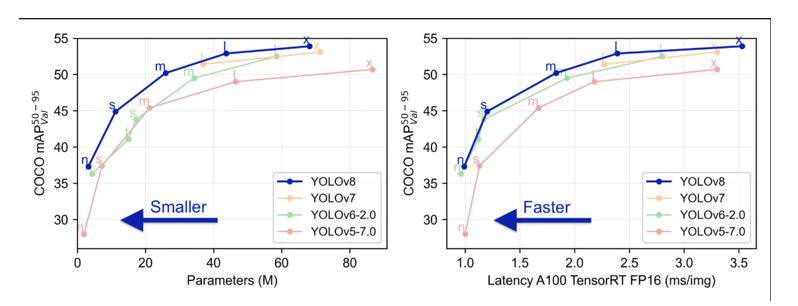
Left Graph: Accuracy vs. Parameters (Model Size)
- X-axis: Number of parameters in millions (M) → indicates model complexity or size.
- Y-axis: COCO mAP50-95 → a standard measure of object detection accuracy.
- Insight:
- YOLOv8 achieves higher accuracy than previous versions at similar or smaller model sizes.
- This means YOLOv8 is more efficient—it gets better results without bloating the model.
Right Graph: Accuracy vs. Latency (Inference Speed)
- X-axis: Latency in milliseconds per image (ms/img) on A100 TensorRT FP16 → lower is faster.
- Y-axis: Again, COCO mAP50-95.
- Insight:
- YOLOv8 delivers higher accuracy at lower latency, meaning it’s faster and more accurate than its predecessors.
- Ideal for real-time applications where speed is critical (e.g., surveillance, robotics).
Hence, YOLOv8 has brought in some key features that sets it apart from earlier versions-
- Smarter Design for Better Detection
YOLOv8 uses advanced building blocks (called backbone and neck) that help it “see” and understand images more clearly. This means it can spot objects more accurately, even in tricky situations.
- No More Anchors—Just Smarter Targeting
Instead of relying on preset boxes (anchors) to guess where objects are, YOLOv8 uses a new method that’s more flexible and precise. This makes detection faster and more accurate, especially for objects of different shapes and sizes. - Fast and Accurate—No Compromise
YOLOv8 is built to be both quick and smart. It balances speed and accuracy so well that it’s perfect for real-time tasks like surveillance, robotics, or mobile apps—where every millisecond counts. - Pick What Fits—Pre-trained Models for Every Need
Whether you need a lightweight model for speed or a heavyweight for top accuracy, YOLOv8 offers several ready-to-use versions. You can choose the one that best fits your project without starting from scratch.
Use cases or problem statement Solved with YOLOV8
Statement1: AI Powered Smart Traffic Signal System.
Goal: Using YOLOV8 model to detect cars,buses,bikes,ambulance vehicles from four directions of a Traffic Junction. Based on number of vehicles detected from each direction, dynamically calculating how long green light should stay on giving more time to denser roads and less time to lighter once. If the detected vehicle is an ambulance, it would give more priority to that lane.
Statement2:Live Detection Inferencing using web camera.
Goal: Using YOLOV8 model on custom dataset, we can simply launch our webcam, and it will do real time object detection and also name the objects whatever it is detecting say it a chair, person or whatsoever comes in front of the web camera. That’s beauty, right since it transforms your everyday webcam into a smart visual sensor, capable of instantly recognizing and labeling objects in real time without any manual input. Whether you’re monitoring a workspace, building an interactive app, or testing your custom-trained model, it’s like giving your camera a brain that understands what it sees.
Statement3:Real-Time Threat Detection in CCTV Footage.
Goal: Want real-time alerts from live streams? YOLOv8’s on it. It recognizes suspicious activity in real time, ideal for high-risk environments such as airports or events. You don’t have to sit and watch hours of videos; YOLOv8 does it in real-time. Its accuracy and velocity reduce response time, providing security teams with a significant advantage.
Statement4: Drone and Delivery Robot Object Tracking
Goal: and robots don’t just need to roll or fly around—there needs to be dodging, following, and adjusting along the way. YOLOv8 makes this possible by the ability to track multiple objects at once, even if they’re moving quickly or making turns. Such as:
- A delivery robot can navigate a sidewalk without bumping into people and animals.
- A drone is able to maintain its focus on a moving target for inspection or shooting purposes.
YOLOv8’s performance makes them never miss a beat even in changing environments.
Pros of YOLOV8
Mosaic Data Augmentation
- YOLOv8 mixes four different images during training to help the model learn better context.
- This technique stops in the final training phase to fine-tune accuracy.
Anchor-Free Detection
- Instead of guessing object locations using preset boxes (anchors), YOLOv8 directly predicts the center of each object.
- This makes training faster and more flexible, especially for custom datasets.
- It also speeds up the cleanup step (called Non-Max Suppression) that removes duplicate guesses.
C2f Module (Improved Backbone)
- YOLOv8 uses a smarter design that combines outputs from all layers (not just the last one).
- This helps the model learn faster and improves how information flows during training.
- It also reduces the computing power needed.
Decoupled Head
- The model now separates two tasks: figuring out what the object is (classification) and where it is (regression).
- Doing these separately improves accuracy and performance.
Smarter Loss Function
- Sometimes the model might detect an object in one place but label it incorrectly.
- YOLOv8 fixes this by using a task alignment score—a smart way to match location and label.
- It calculates this score using:
- BCE Loss: Measures how far off the predicted label is.
- CIoU Loss: Checks how well the predicted box matches the real object’s shape and position.
- DFL (Distributional Focal Loss): Focuses more on hard-to-detect objects that the model often misses.
Cons of YOLOV8
Depends Heavily on Good Training Data
- YOLOv8 works great with common images, but if your data is very unique or niche, it might not perform well.
- It needs a wide variety of examples to learn properly—missing types can lead to poor results.
Trouble Spotting Tiny Objects
- Small items in an image (like a pen or insect) can be hard for YOLOv8 to detect.
- That’s because the model might not “see” enough detail in tiny areas to recognize them accurately.
Needs Powerful Hardware
- Training YOLOv8 requires strong GPUs and lots of memory.
- Running it on small devices (like mobile phones or Raspberry Pi) can be tricky unless you optimize it first.
Doesn’t Understand Object Relationships Well
- YOLOv8 looks at the whole image but doesn’t always grasp how objects relate to each other.
- In complex scenes, it might misinterpret what’s happening—like confusing a person holding a tool with just the tool.
Alternatives to YOLOV8
SSD (Single Shot MultiBox Detector)
- It’s fast and lightweight—great for mobile apps or devices with limited power.
- Easier to train and deploy for basic object detection tasks.
- Best for: Real-time detection on phones, tablets, or embedded systems.
Faster R-CNN
- Very accurate, especially for complex scenes and small objects.
- Uses a two-step process: first finds object regions, then classifies them.
- Best for: Projects where accuracy matters more than speed (e.g., medical imaging, wildlife monitoring).
RetinaNet
- Balances speed and accuracy well.
- Handles small objects better than YOLO in many cases.
- Best for: Detecting tiny items in cluttered images (e.g., drones, satellite imagery).
ThirdEye Data’s Project Reference Where We Used YOLOV8
AI-Powered Smart Traffic Management System
Urban areas face growing traffic congestion, frequent accidents, and law enforcement challenges, leading to longer commute times, safety risks, and inefficiencies. Our AI-powered Smart Traffic Management System leverages computer vision and real-time surveillance analysis to detect traffic congestion, violations, and accidents instantly. This enables faster response times, optimized traffic flow, and improved urban mobility.
Python Implementations:
Step-1: Install Required Tools
First, make sure Python is installed. Then open your terminal or command prompt and run:
- pip install ultralytics.
This installs the YOLOv8 package from Ultralytics.
Step-2:Download a Pre-trained YOLOv8 Model
You can use a ready-made model like YOLOv8n (nano), YOLOv8s (small), YOLOv8m (medium), etc.
- from ultralytics import YOLO
- model = YOLO(“yolov8n.pt”) # You can change to yolov8s.pt or yolov8m.pt
Step-3: Run Detection on an Image
- results = model(“your_image.jpg”) # Replace with your image path results[0].show() # Displays the image with boxes and labels
Step-4:Train on Your Own Dataset
If you have custom images and labels:
- yolo task=detect mode=train model=yolov8n.pt
- data=data.yaml epochs=50 imgsz=640data.yaml: should describe your dataset (classes, paths).
Epochs: is how many times the model learns from your data
Answering Some Frequently Asked Questions on Azure SQL Data Warehouse:
Can YOLOv8 be used on mobile devices?
Yes! YOLOv8 can run on mobile devices, especially when converted to formats like ONNX or TensorFlow Lite. With its lightweight architecture, it performs well on both Android and iOS apps, making it ideal for real-time tasks such as object detection through your phone’s camera. For edge-specific tips, visit our YOLOv8 on Edge Devices guide.
What programming languages support YOLOv8?
YOLOv8 is mainly Python-based and works smoothly with frameworks like PyTorch. However, once exported, it can integrate with apps built in C++, JavaScript, Swift, or Java using appropriate inference libraries. This makes it super versatile across platforms and devices.
Is YOLOv8 suitable for startups and small businesses?
Absolutely! YOLOv8 is an open-source and efficient model, perfect for startups that require high performance on a tight budget. You can build custom solutions without incurring the expense of expensive hardware or software licenses. If you’re looking to get started, our guide on training YOLOv8 with your data is a great starting point.
Does YOLOv8 Continue to Utilize YOLO (You Only Look Once)?
Indeed, YOLOv8 still follows the same “You Only Look Once” idea but with a grand redesign. The idea is the same in principle: object detection in a single pass of the neural network, resulting in a speedy and efficient process. However, YOLOv8 enhances nearly every aspect of the architecture to make the model smarter and more accurate than ever.
So, the YOLO attitude is still there, but what goes on behind the scenes is radically different. YOLOv8 is stronger, more efficient, and designed to keep pace with the evolving demands of deep learning today. It’s the difference between a flip phone and a smartphone—same goal, so many more bells and whistles.
Conclusion:
YOLOv8 is one of the smartest tools we have today for spotting objects in images and videos—fast, accurate, and ready to use in many real-world situations. But like any powerful tool, it has its limits. It can struggle with unusual data, tiny objects, and needs strong computers to run well. It also doesn’t always understand the full picture and can be tricked by sneaky image changes.Still, researchers and developers are working hard to fix these issues and make YOLOv8 even better. As computer vision keeps growing, YOLOv8 continues to lead the way, helping us build smarter apps, safer systems, and more intelligent machines.