

Azure blobs
Azure Blob Storage is Microsoft Azure’s cloud-native object storage solution, specifically designed to store massive volumes of unstructured data. Unstructured data refers to content that doesn’t follow a fixed schema—such as text files, images, videos, audio, logs, and binary data. Blob stands for Binary Large Object, and Azure Blob Storage is optimized to handle these efficiently across global, scalable infrastructure. It is a core component of the Azure Storage suite and is used extensively in data lakes, backup systems, media repositories, and analytics pipelines.

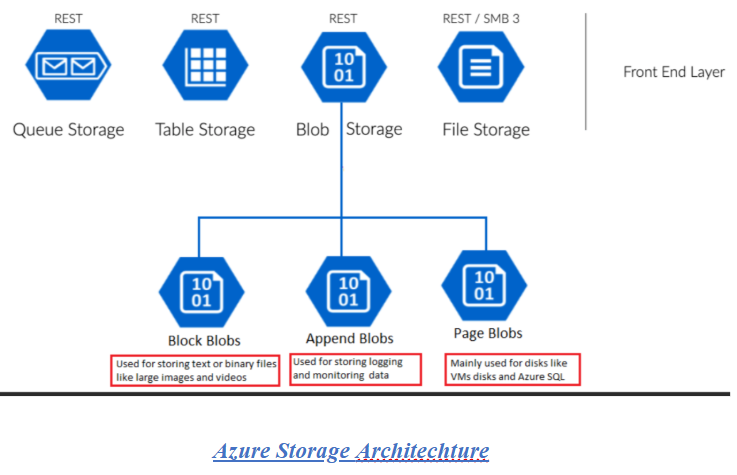
Architecture of Azure Blob storage:
Azure Blob Storage supports a wide range of use cases across industries and workloads:
- Serving Images or Documents to Browsers
- Host static assets like PDFs, images, and HTML files.
- Enable direct access via public URLs or secure tokens.
- Commonly used in web apps, portals, and content delivery systems.
- Storing Files for Distributed Access
- Ideal for applications that require shared access to files across regions or services.
- Supports concurrent reads and writes with high availability.
- Used in collaborative platforms, distributed systems, and microservices.
- Streaming Video and Audio
- Store media files and stream them to users on-demand.
- Integrates with Azure CDN for low-latency delivery.
- Suitable for OTT platforms, e-learning, and digital media archives.
- Writing to Log Files
- Append blobs allow efficient logging from applications and services.
- Supports telemetry, diagnostics, and audit trails.
- Common in IoT, DevOps, and security monitoring workflows.
- Backup, Restore, Disaster Recovery, and Archiving
- Store snapshots, backups, and archival data with tiered access (Hot, Cool, Archive).
- Geo-redundant storage ensures cross-region durability.
- Used by enterprises for compliance, retention, and business continuity.
Use Cases or problem statement solved with Azure Blob Storage:
- Backup and Disaster Recovery
- Problem: Enterprises need reliable, cost-effective long-term storage for critical data backups.
- Goal: Store backups in a durable, geo-redundant location with lifecycle policies to manage retention.
- Blob Role: Use Cool or Archive tier for infrequent access; automate backup uploads via Azure CLI or Data Factory; enable GRS for cross-region replication.
- Static Website Hosting
- Problem: Hosting static content (HTML, CSS, JS) on traditional servers is costly and hard to scale.
- Goal: Serve static websites directly from blob containers with global reach and minimal latency.
- Blob Role: Enable static website hosting on Blob Storage; use the $web container; integrate with Azure CDN for performance.
- Big Data Analytics Pipeline
- Problem: Raw data from multiple sources needs to be ingested and stored before processing.
- Goal: Create a scalable landing zone for big data workloads and integrate with analytics engines.
- Blob Role: Store raw data in Blob Storage; process with Azure Databricks, HDInsight, or Synapse; use hierarchical namespace with Data Lake Gen2.
- Media Storage and Streaming
- Problem: Applications need to store and deliver large volumes of media content globally.
- Goal: Store high-resolution images and videos with fast, reliable access for users.
- Blob Role: Use Block blobs for media; integrate with Azure CDN for low-latency delivery; apply access policies and SAS tokens for secure sharing.
- IoT Data Storage
- Problem: IoT devices generate continuous streams of telemetry data that must be stored and analyzed.
- Goal: Store time-series data efficiently and make it available for downstream analytics.
- Blob Role: Append blobs for log-style ingestion; integrate with Event Grid and Azure Functions for real-time triggers; archive older data automatically.
Pros of Azure Blob Storage:
- Highly Scalable & Durable
Supports petabyte-scale storage with automatic scaling and multiple redundancy options (LRS, ZRS, GRS).
- Flexible Access Tiers
Offers Hot, Cool, and Archive tiers to optimize cost based on access frequency and retention needs.
- Deep Azure Integration
Seamlessly connects with Azure services like Data Factory, Synapse, Functions, Logic Apps, and CDN.
- Secure by Design
Built-in encryption at rest and in transit, RBAC, private endpoints, and integration with Azure Key Vault.
- Global Availability & Redundancy
Geo-redundant storage ensures high availability across regions, supporting disaster recovery strategies.
- Event-Driven Architecture Support
Triggers workflows using Event Grid, enabling reactive pipelines with Functions or Logic Apps.
- Static Website Hosting
Can serve static content directly from blob containers, integrated with Azure CDN for performance.
Cons of Azure Blob Storage:
- Complex Pricing Model
Costs vary by access tier, operations, data transfer, and redundancy—can be hard to predict and optimize.
- Latency for Archive Tier
Archive tier retrieval can take hours, unsuitable for time-sensitive workloads.
- Limited Real-Time Streaming
Not designed for low-latency streaming or frequent small-object access; append blobs help but aren’t ideal.
- No Native File System Semantics
Doesn’t support locking, random access, or hierarchical file operations like traditional file systems.
- Access Control Complexity
SAS tokens, RBAC, and container-level permissions require careful configuration to avoid security gaps.
- Versioning & Lifecycle Management Require Setup
Features like blob versioning and automatic tiering need manual configuration and monitoring.
Alternatives to Azure Blob Storage:
- Amazon S3
- Industry-standard object storage
- Rich ecosystem and analytics integration
- Complex IAM policies and higher egress costs
- Google Cloud Storage (GCS)
- Fast access and simple tiering
- Strong ML and analytics integration
- Less hybrid support compared to Azure
- IBM Cloud Object Storage
- Enterprise-grade security and compliance
- Multi-region redundancy
- Smaller developer ecosystem
- Oracle Cloud Storage
- Integrated with Oracle workloads
- Strong SLAs and governance
- Limited adoption outside Oracle stack
Third Eye Project Reference where we used Azure Blob:
Answering some Frequently asked questions about Azure Blob:
- What types of data can Azure Blob Storage handle?
Azure Blob Storage is designed for unstructured data—including documents, images, videos, logs, backups, and binary files. It supports three blob types: Block blobs (general-purpose), Append blobs (log-style data), and Page blobs (used for virtual hard disks).
- How does Blob Storage ensure data durability and availability?
It offers multiple redundancy options:
- LRS (Locally Redundant Storage) for single-region durability
- ZRS (Zone-Redundant Storage) for intra-region high availability
- GRS (Geo-Redundant Storage) for cross-region disaster recovery
These ensure your data remains safe even during hardware failures or outages.
- Can I control access to blobs securely?
Yes. Azure Blob Storage supports Role-Based Access Control (RBAC), Shared Access Signatures (SAS), and private endpoints. You can also integrate with Azure Active Directory for identity-based access management.
- What are the access tiers and how do they affect cost?
Blob Storage offers four tiers:
- Hot – for frequently accessed data
- Cool – for infrequent access
- Archive – for long-term storage with delayed retrieval
- Premium – for low-latency workloads
Choosing the right tier based on access patterns helps optimize storage costs.
- Can I automate data lifecycle management?
Yes. You can define lifecycle policies to automatically transition blobs between tiers or delete them based on age, last access, or custom rules. This helps manage storage costs and retention compliance.
- Is Blob Storage suitable for big data analytics?
Absolutely. Blob Storage integrates with Azure Data Lake Gen2, Azure Synapse, Databricks, and HDInsight, making it ideal for storing raw data and feeding analytics pipelines.
- Can I host a static website using Blob Storage?
Yes. You can enable static website hosting on a blob container (typically $web) and serve HTML, CSS, and JS files directly. Combine with Azure CDN for global performance.
- How is Blob Storage priced?
Pricing depends on:
- Storage tier (Hot, Cool, Archive)
- Data volume stored
- Read/write operations
- Data transfer (egress)
Use the Azure estimate costs.
Conclusion:
Azure Blob Storage is a cornerstone of cloud-native data architecture—offering scalable, secure, and flexible object storage for a wide range of use cases. Whether you’re building data lakes, backup systems, media repositories, or IoT telemetry pipelines, Blob Storage provides the durability, integration, and cost-efficiency needed for modern workloads. Its deep integration with Azure services like Data Factory, Synapse, Functions, and Event Grid makes it ideal for orchestrating complex data workflows. However, it’s important to carefully configure access controls, lifecycle policies, and tiering strategies to avoid cost overruns and security gaps.