The Power of BigQuery: Turning Big Data into Big Insights
“When your data outgrows your database, BigQuery lets you turn petabytes into insights — without the pain of infrastructure.”
Imagine you’re the analytics lead at a fast-growing startup. In a few months, your PostgreSQL warehouse is groaning — nightly jobs take hours, joins crash, dashboards lag. Your CEO wants answers: “Which marketing campaigns drove the highest retention this quarter?” — but the data is scattered: logs in Cloud Storage, campaign data in Bigtable, user profiles in Firestore, and old CSVs in GCS.

You decide to experiment with BigQuery. You upload your logs, point it at your storage bucket, set up federated queries, and in minutes you’re writing SQL across all that data. Later, you add BigQuery ML to build prediction models. Suddenly, you’re not just analyzing — you’re predicting. And you never provisioned a server.
That’s the promise of Google BigQuery: truly serverless, scalable, SQL-first, and built for analytics + ML at scale. It’s become a core building block in modern data & AI architectures.
In this article, we’ll dig deep into:
- What BigQuery is, and how it fits into the Google ecosystem
- Core use cases and problems it solves
- Pros, trade-offs, and where it falls short
- Alternatives and when to use them
- Industry trends, updates, and where BigQuery is headed
- Project references & real examples
- FAQs
- A conclusion and call to action
Let’s start by understanding what BigQuery really is.
What Is BigQuery?
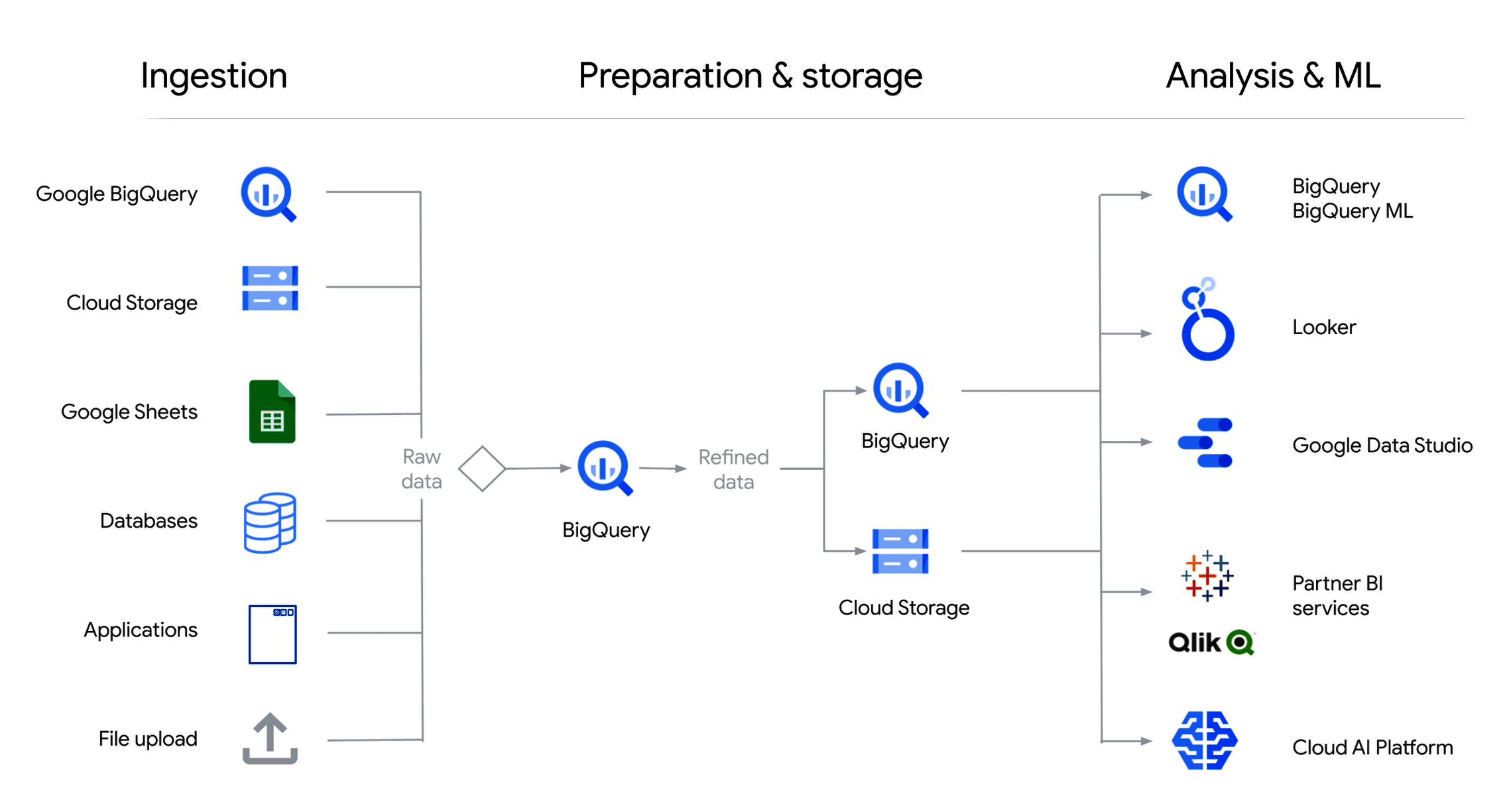
Image Courtesy: k21academy
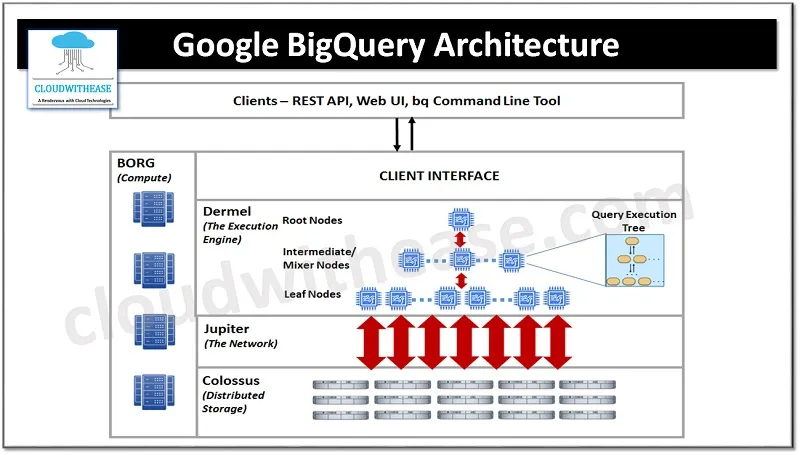
Image Courtesy: Cloudwithease
Google BigQuery is Google Cloud’s fully managed, serverless data warehouse / analytics engine designed for large-scale data storage and querying. It abstracts away infrastructure: you don’t manage servers, scale clusters, or tune indexes. You just upload your data (or point to it), run SQL queries, and get fast results—even across terabytes or petabytes.
Key attributes:
- Serverless architecture: No servers to provision or manage; Google handles scaling, availability, patching.
- Separation of storage and compute: You pay storage costs separately; compute is charged per query (bytes processed).
- Standard SQL interface: Uses ANSI SQL (extended for BigQuery) so analysts and engineers can use familiar syntax.
- Federated & external data access: Can query data in external sources (Cloud Storage, Google Sheets, Bigtable) without full ingestion.
- Built-in ML support (BigQuery ML): Train and serve models from within SQL.
- Scalable & fast analytics engine: Under the hood, BigQuery is built on Google’s Dremel technology, enabling massively parallel ad-hoc queries.
- Integrated with GCP ecosystem: Works well with Cloud Storage, Pub/Sub, Dataflow, Dataproc, AI Platform, IAM, etc.
Because of this design, BigQuery is often the analytical backbone of many modern systems, feeding dashboards, BI tools, ML pipelines, and more.
Use Cases / Problem Statements Solved with BigQuery
Here’s where BigQuery shines — scenarios where it often becomes the right choice.
- Data Warehousing & Analytics at Scale
If your data volumes grow beyond relational databases, BigQuery allows scalable storage + interactive analytics across massive datasets.
- Centralized Data Lake + Analytics
Ingest raw logs, structured data, semi-structured JSON data, and query across them unified in BigQuery (or via federated access).
- BI & Dashboard Backends
Serve dashboards (Looker, Data Studio, other BI tools) with fast query response, especially for large aggregates or time-series analysis.
- Ad hoc Analytics & Exploration
Analysts and data scientists can explore large datasets quickly without waiting for ETL or provisioning clusters.
- Real-time Analytics / Streaming Ingestion
With streaming inserts / Pub/Sub integration, BigQuery supports near-real-time analytics (e.g. dashboards reflecting recent events).
- Machine Learning & Predictive Analytics
Use BigQuery ML to build models (linear regression, logistic regression, boosted trees, ARIMA, etc.) directly on your data without moving it to separate ML infrastructure.
- Geospatial Analytics
BigQuery supports GEOGRAPHY data types and spatial functions to run map-based analytics (e.g. geospatial aggregations, radius searches).
- Log Analysis & Auditing
Analyze application logs, security logs, or compliance data at scale. Combine them with other data sources.
- Multi-source / Hybrid Analytics
Combine structured warehouse data with external sources (Bigtable, Cloud Storage) via federated queries or external tables.
- Semantic Search / Vector Analytics
Because BigQuery has now added support for vector search and embeddings (late 2024 / early 2025 feature) — enabling integration with RAG use cases.
Real-world problem statements solved:
- “We can’t answer complex queries over months of logs because our data warehouse is slow / over budget.”
- “We want to build predictive churn or forecast models without moving data to separate ML systems.”
- “Our dashboards stall or timeout when datasets grow.”
- “We need to combine JSON logs + relational tables + data lake files in one query.”
- “We need semantic / embedding search over text data, and optionally ML integration.”
When you want simplicity, scale, strong integration, and minimal ops overhead — that’s when BigQuery becomes compelling.
How BigQuery Is Connected (Architecture & Mechanism)
To really appreciate BigQuery, it helps to understand how it’s built and how its components interconnect.
- Storage Layer (Colossus / Capacitor)
Data in BigQuery doesn’t live in traditional relational files — it gets stored in optimized columnar storage (Capacitor) on Google’s distributed storage (Colossus). This enables efficient IO and compression.
- Query Engine (Dremel & Serving Layers)
When you execute a query, it’s broken into a tree of execution units. BigQuery uses Dremel technology — a massively parallel, columnar reading and aggregation engine — to execute with low latency at scale.
- Compute Execution & Slot-based Resource Model
BigQuery uses slots (units of computational power) to execute queries. Internally, your queries borrow slots as needed. For projects, you may reserve slots (Flat-rate) for dedicated capacity.
- Separation of Storage + Compute
Because compute and storage are decoupled, scaling, caching, and resource management are more flexible. You can query huge data without needing to scale storage separately.
- Materialized Views, Partitioned Tables, Clustering
To optimize performance, BigQuery supports:
- Partitioning (e.g. date partitions) to limit scan ranges
- Clustering (on key columns) to co-locate related data
- Materialized views for frequently used aggregated results
These reduce scanned data and improve query speed.
- Federated Tables / External Data
You can query data in external sources (Cloud Storage, Sheets, Bigtable) without fully ingesting — BigQuery treats them as external tables.
- Streaming Ingestion
BigQuery allows streaming inserts, enabling near-real-time analytics. Internally, streaming buffers and micro-batches are used before data lands in columnar storage.
- BigQuery ML
You can define models using SQL (CREATE MODEL) and train them within BigQuery. The training, evaluation, inference happen inside the same environment. No data export is required.
- Vector Search + Embeddings
In recent updates, BigQuery supports vector search capabilities — enabling embedding-based similarity search and RAG workflows natively inside SQL.
- Integration with GCP Ecosystem
- Dataflow / Pub/Sub: streams into BigQuery
- Cloud Storage: source for load jobs or external tables
- Vertex AI: models trained or served inside BigQuery / models consume data
- IAM & Security / VPC / Logging: governance layer
- Looker / Data Studio: BI over BigQuery
- APIs / Client Libraries: programmatic access
- BiqQuery Omni / Cross-Cloud capabilities: query data across multiple cloud providers
Thus, BigQuery acts as the central engine tying together data ingestion, analytics, ML, BI, and AI use cases.
Pros (Why Use BigQuery)
What makes BigQuery compelling and why many organizations choose it:
- Simplicity & Managed Experience
You don’t worry about servers, cluster sizing, or scaling. It’s serverless: you focus on data and queries. - Scalability & Performance
BigQuery handles petabytes of data and thousands of concurrent queries with ease. - Cost Efficiency (when used well)
You pay per byte processed (on-demand) or via flat-rate (reserved slots), allowing flexible cost control. - SQL Familiarity
Analysts and data teams can use familiar SQL for complex analytics, even joining wide, nested data. - Tight Integration with GCP Services
Seamless integration with storage, pipelines, ML, AI, BI tools, security, etc. - Built-in Machine Learning
BigQuery ML lets you build and deploy models without moving data, reducing friction for predictive analytics. - Federated / External Table Access
You can query data where it lives without full ingestion. - Vector Search & Embedding Support
With new features, you can do semantic search inside BigQuery — combining analytics + AI in one place. - Enterprise Governance & Security
IAM, row-level security, encryption, audit logs, VPC activation, data location controls. - Speed of Innovation & Updates
BigQuery continues evolving: new query performance optimizations, open table engines (Iceberg), integrated governance tools.
Cons / Trade-Offs & Challenges of BigQuery
BigQuery is powerful, but it’s not always a panacea. Here are when it may not be ideal:
- Cost Spikes from Unoptimized Queries
Poor query design or full table scans can lead to unexpectedly high costs. - Latency for Very Low-Latency Use Cases
It’s analytics-focused, not built for ultra-low-latency OLTP or sub-millisecond transactional queries. - Limited Control Over Execution
You can’t (easily) control low-level cluster behavior, caching strategies, or execution internals. - Data Freshness Limitations
In streaming or very high-frequency ingestion scenarios, slight lag or buffering may occur. - Costs of Storage + Query Combined
Large data volumes incur significant storage costs as well as query costs. - Learning Curve for Performance Tuning
Proper partitioning, clustering, and query planning are essential. Without them, performance suffers. - Vendor Lock-In & Portability
Heavily using BigQuery-specific SQL, connectors, or features can make migration to other warehouses (e.g. Snowflake, Redshift) harder. - Feature Gaps in Dense ML / Deep Learning
For training large neural networks, BigQuery ML is not a replacement for dedicated ML frameworks. - Vector Search Maturity
The new vector search capabilities are promising but still emerging and may lack full production maturity in some edge cases.
Alternatives to BigQuery
If BigQuery doesn’t fit, these are some alternatives and where they perform:
- Snowflake — powerful cloud data warehouse with multi-cloud support, strong performance, rich SQL features.
- Databricks / Delta Lake / Lakehouse architectures — combine data lake + warehousing, powerful for big data ETL + AI.
- Amazon Redshift — AWS’s managed warehouse, good for AWS-centric stacks.
- Azure Synapse / Azure SQL Data Warehouse — for Microsoft-oriented stacks.
- ClickHouse / MPP analytics engines — high-performance, open-source, good for real-time analytics.
- Apache Spark / Presto / Trino — flexible analytics engines running on compute clusters, more control but more management.
- On-prem / hybrid data warehouses — when strict data residency or offline operations matter.
Each trade-off involves flexibility vs convenience, cost vs control, performance vs operations.
Upcoming Updates / Industry Insights on BigQuery
BigQuery continues to evolve. Here are recent enhancements and trends to watch:
- Vector search generally available
BigQuery now supports embedding / vector search features, enabling semantic search workflows inside your data warehouse. - History-based query optimization
BigQuery learns from query patterns and optimizes execution to reduce resource consumption. - Open table formats & Apache Iceberg support
BigQuery now previews support for Iceberg-compatible storage formats, giving more flexibility and control over data layouts. - Spark in BigQuery / Unified analytics workspace
You can run Apache Spark inside BigQuery without leaving the interface — combining SQL and Spark seamlessly. - Data + AI Governance
Better integration with data catalogs, lineage, quality, compliance controls (Dataplex) directly in BigQuery. - Continuous Queries & Real-time Inference
BigQuery supports continuous SQL queries and real-time ML inference within the warehouse. - Gemini & Generative AI inside BigQuery
Preview of generative SQL assistance, AI-infused insights based on table metadata, and query generation via AI. - Cross-region disaster recovery / managed failover
BigQuery now has improved cross-region redundancy and failover capabilities. - These updates point toward BigQuery becoming not just a warehouse, but a central AI + analytics platform where insights, generative models, and query services converge.
Project References of BigQuery
Frequently Asked Questions on BigQuery
Q1: Is BigQuery only for analytics, not for OLTP?
Yes — BigQuery is optimized for large-scale analytical queries, not transactional workloads with many small writes or row-by-row updates.
Q2: How does pricing work?
You pay for the data processed (on-demand) or reserve slots (flat-rate), plus storage costs. Optimize your queries to avoid scanning unnecessary data.
Q3: Can I bring my own model / framework?
Yes — you can export data, connect to external ML systems, or bring your own models via Vertex AI or external compute.
Q4: How fresh is streaming data?
Streaming insert mode allows near real-time analytics; internal buffering and ingestion latencies may apply.
Q5: What is vector search in BigQuery?
Vector search allows similarity-based queries using embeddings stored as columns in BigQuery — enabling RAG workflows nested within SQL. (New feature)
Q6: How do I optimize performance?
Use partitioning, clustering, materialized views, limiting data scanned with filters, avoiding SELECT * patterns, and caching.
Q7: Can I query data outside GCP or other clouds?
Via federated queries or external tables (e.g. Cloud Storage) to some extent. BigQuery Omni and multi-cloud features also allow querying data in other clouds.
Third Eye Data’s Take on BigQuery
BigQuery is more than a data warehouse — it’s an evolving, serverless, AI-enabled platform that powers analytics, ML, and more. Its blend of scalability, simplicity, advanced capabilities (ML, embeddings), and integrationmakes it a cornerstone of modern data systems.
If you’re running data workloads that strain your databases or pipelines, BigQuery is a compelling next step. But to succeed:
- Start by ingesting a slice of your data.
- Run analytics queries and profile performance.
- Add ML use cases (BigQuery ML).
- Explore the new vector search capabilities.
- Optimize with partitioning, clustering, and good query hygiene.
- Integrate with AI/BI tools like Vertex AI, Looker, and your custom apps.
Head to your Google Cloud console. Enable BigQuery (or start using the free sandbox). Load a dataset (public or your own). Write SQL to explore it. Try creating a simple model with BigQuery ML. Then, experiment with embedding and vector search features if available in your region.
Once you see the power of SQL queries over petabytes, you’ll understand why so many teams choose BigQuery as the engine of their data & AI architectures.