ThirdEye Data Logo - For Official Use

Automated Content Publishing Solution

Manual publishing workflows slow down enterprise content operations. Our automated content publishing solution eliminates the need for copy-pasting and manual formatting between Google Docs and WordPress. It parses and converts Google Docs into structured, WP Bakery-compatible WordPress drafts automatically, preserving formatting, components, and images. The result: hours of manual work reduced to minutes, consistent content quality, and frictionless collaboration between writers, editors, and developers.

This image is highly relevant for the Automated Content Publishing Solution.

Business Challenges or Pain Points Addressed

  • Manual Content Transfer Bottleneck: Teams spend hours copying and formatting articles between Google Docs and WordPress.

  • Formatting Inconsistencies: Manual publishing causes broken layouts and inconsistent styling.

  • Complex Component Setup: WPBakery elements and custom shortcodes require tedious manual configuration.

  • Image Handling Issues: Downloading, optimizing, and uploading images manually adds major delays.

  • Error-Prone Workflow: Typos, broken links, and missing sections frequently occur.

  • Limited Scalability: Manual publishing restricts the number of articles teams can manage.

  • Lack of Version Control: Difficult to track changes between Google Docs and WordPress content.

Our Solution Approach

The solution delivers end-to-end automation from content creation to draft publication:

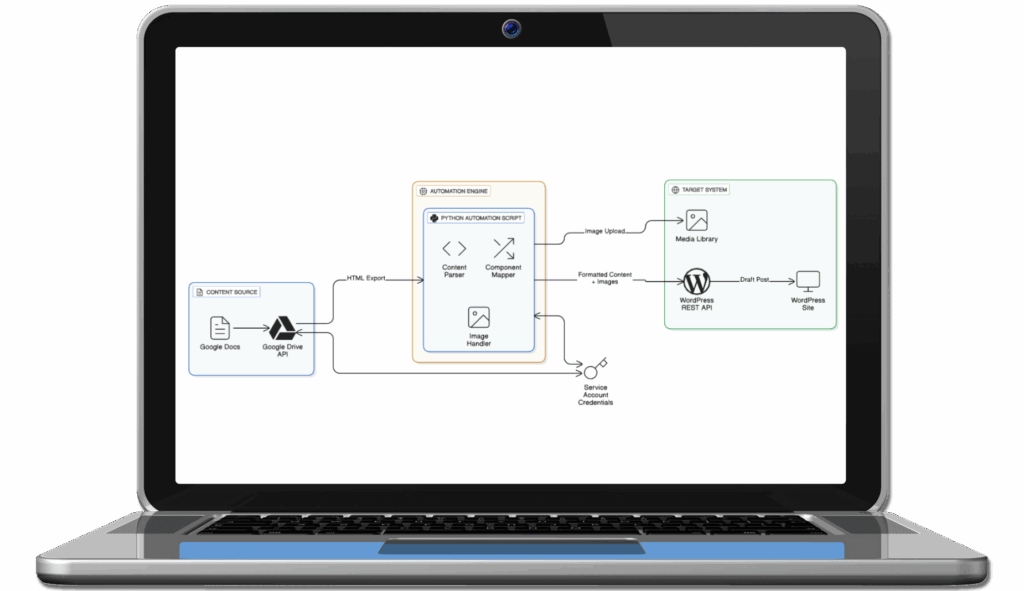
  • Integrates directly with Google Docs and Drive APIs to fetch document content.

  • Recognizes document structure (headings, lists, code, callouts, images).

  • Maps Google Docs formatting into WPBakery shortcodes automatically.

  • Uploads images to WordPress media library and updates references.

  • Publishes formatted articles as WordPress drafts via REST API.

  • Preserves all hyperlinks, metadata, and custom shortcodes.

  • Enables one-click publishing, reducing manual intervention to seconds.

Technologies Used

  • Programming: Python 3.x

  • APIs: Google Drive API, Google Docs API, WordPress REST API

  • Libraries: BeautifulSoup4, lxml, Requests, python-slugify, python-dotenv

  • Authentication: OAuth2, Google Service Accounts

  • CMS: WordPress + WPBakery Page Builder

  • Deployment: Cross-platform compatible with virtual environments

Core Features of This Solution

Laptop with document downloading, illustrating data management and digital workflows.

Automated Document Parsing & Extraction

Reads and converts Google Docs content via API into structured HTML while preserving all formatting elements.

This image is relevant for the Automated Content Publishing Solution

Intelligent Content Type Detection

Identifies headings, lists, paragraphs, code blocks, callouts, and custom shortcodes automatically.
Three blue computer screens with a gear icon, representing automation and technology integration.

Custom Component Mapping Engine

Transforms Google Docs formatting into WPBakery-compatible shortcodes for professional page layouts.

This image is an excellent visual for the Automated Content Publishing Solution

Seamless Image Processing Pipeline

Extracts, uploads, and links document images directly to the WordPress media library.

This image is a relevant fit for the Automated Content Publishing Solution.

Preserved Metadata & Hyperlinks

Maintains titles, categories, links, and SEO-friendly structure during transfer.
This image is also appropriate for the Automated Content Publishing Solution

Error Handling & Validation

Validates permissions, document structure, and API access before publishing.

Tangible Business Value Across Functions

Illustration of a team collaboration concept with a central figure surrounded by gear and two supporting figures, representing automated document processing and content management solutions.

Content Teams

Save 90% of publishing time. They can focus on research & writing, not formatting or uploading.

Portfolio folder with documents and images, representing project showcases and professional work.

Marketing & SEO Teams

Ensure consistent brand design and structure, improving SEO ranking and page performance.
Programmer with a laptop and thought bubble, representing coding and problem-solving in technology.

Engineering / Web Ops

Reduce dependency on developers for layout adjustments or technical publishing support.

This image is a strong visual fit for the Automated Content Publishing Solution.

Operations & Project Managers

Increase throughput and content velocity for large-scale publishing campaigns.

Enterprise agentic AI-based customer loyalty assistant solution blending AI agents, behavior analytics, segmentation and real-time campaign recommendations

Executives & Leadership

Drive operational efficiency and save $50K+ annually in publishing costs with scalable automation.


Automate Your Publishing Workflow

Transform your Google Docs into WordPress-ready content in minutes. Book a demo today!

Real-World Value Created Through This Automation

  • 95% reduction in publishing time (from 2–3 hours to 5 minutes).

  • $50K+ annual cost savings from reduced manual effort.

  • 10–15x more content throughput per week.

  • 90% fewer formatting errors and layout inconsistencies.

  • Scales from 10 to 100+ articles monthly without adding headcount.

What Makes This Solution Different

The solution covers all the loopholes of traditional publishing tools. This system is developer-grade yet content-friendly, combining intelligent parsing, shortcode mapping, and seamless integration across Google Workspace and WordPress. It’s modular, secure, and scalable; ready for integration with AI-driven content generation and LLM-based research extensions.

FAQs – Answering Common Business Asks

  • Does it support custom shortcodes like [bstack_callout]?
    Yes, all existing site-specific shortcodes are detected and preserved.

  • Can it handle large-scale content migrations?
    Yes, it supports batch and concurrent publishing for high-volume operations.

  • Are images optimized automatically?
    Yes, images are extracted, uploaded, and referenced directly in WordPress media.

  • Is it secure?
    It uses service account authentication with OAuth2 for enterprise-grade security.

  • Can it integrate with multilingual or headless setups?
    Yes, it’s fully extensible to support multilingual publishing and headless CMS architectures.

Book a Demo to Interact and See It in Action

CONTACT US